
ERROR
403 error: app_not_configured_for_user ArcGIS Online configured with Google Workspace
Error Message
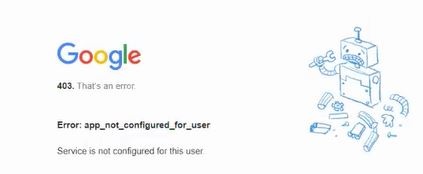
After configuring a SAML login between ArcGIS Online and Google workspace, a 403 error is returned after entering Google credentials.
Error: app_not_configured_for_user
Service is not configured for this user
Cause
There are multiple causes for this error.
Solution or Workaround
- Confirm that the Google Workspace SAML app has been granted permission to the respective user. An app can be shared in Google Workspace to either everyone or for selected users. It could be the case that this user is not in a group with permission to access the Google Workspace SAML app. This must be reviewed by the Google Workspace Administrator.
- Review the service provider details in the Google Workspace SAML app. Again, this must be reviewed by the Google Workspace Administrator. The ACS URL, Entity ID and Start URL are all case-sensitive and must be in the required formats listed below:
- ACS URL: https://<domain>.maps.arcgis.com/sharing/rest/oauth2/saml/signin
- Entity ID: <domain>.maps.arcgis.com
- Start URL : https://<domain>.maps.arcgis.com/home/signin.html?
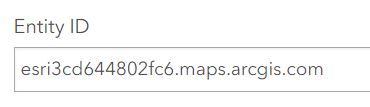
- Verify that the details in the ArcGIS Online log-in configuration are correct. Even though fields get pre-populated, it is important to confirm this. For example, the Entity ID visible in Advanced Settings is case-sensitive and must match the url of the ArcGIS subscription, as shown in the image below.
Article ID: 000033096
Software:
- ArcGIS Online
Get support with AI
Resolve your issue quickly with the Esri Support AI Chatbot.


Related Information
Discover more on this topic

Search for related information

Find training related to this topic

Explore ideas and give feedback
Get help from ArcGIS experts
Start chatting now