
HOW TO
Recover a corrupted ArcGIS Online Workforce project after the default project group is deleted
Summary
When you create an ArcGIS Workforce project in ArcGIS Online, a corresponding ArcGIS Online group is automatically generated. If this group is accidentally deleted, access to the Workforce project will be lost, resulting in a blank screen when you attempt to open that specific project.
Since the items associated with the Workforce project are automatically added to the default group, deleting this group disrupts the connection between the items and the project.
Procedure
- Create a new group in ArcGIS Online
- Add the original hosted feature layer and web map (created automatically with the Workforce Project) to the group.
- Copy the groupID of the new group from the address bar of the browser, as shown in the next image.

- Open the JSON of the original hosted feature layer in the ArcGIS Online Assistant, and select View/Edit JSON.
- Replace the "workforceProjectGroupId" parameter with the new group ID (copied in Step 3) and save it.
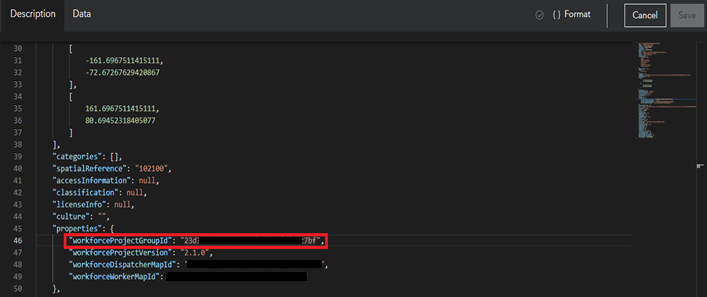
- Open the project in ArcGIS Workforce.
- Wait for 2-4 seconds, the Workforce Project will start working normally.
Article ID: 000037900
- ArcGIS Online
- ArcGIS Workforce
Get support with AI
Resolve your issue quickly with the Esri Support AI Chatbot.


Discover more on this topic

Search for related information

Find training related to this topic

Explore ideas and give feedback
Get help from ArcGIS experts
Start chatting now