
PROBLEM
Updates to referenced map image layers not reflected in the ArcGIS Enterprise portal
Description
When sharing a web map as a referenced map image layer from ArcGIS Pro, updates to the source data are not immediately visible in Map Viewer. Although the layer directly references the registered data source and is expected to reflect current changes, rendering or caching delays cause outdated or inaccurate display.
Cause
The map image layer is published using the Visualization configuration, which creates a cached image service optimized for fast display performance. The cache must be rebuilt and replaced to reflect edits to the source data. As a result, changes are not immediately visible and are only reflected after the cache is updated, causing a delay based on the cache update process.
Solution or Workaround
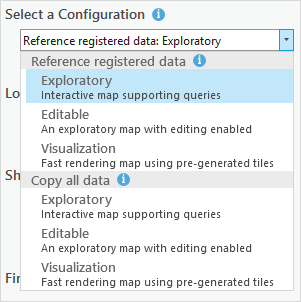
In ArcGIS Pro, publish the web map using the Reference registered data: Exploratory configuration in the Share As Web Map pane to dynamically reference the source data. This configuration ensures edits to the source data are immediately reflected in the service, as no data is cached for rendering. Refer to ArcGIS Pro: Share a web map using a chosen configuration for instructions.
Article ID: 000037476
- ArcGIS Pro
- Portal for ArcGIS
- ArcGIS Enterprise
Get support with AI
Resolve your issue quickly with the Esri Support AI Chatbot.


Related Information
Discover more on this topic

Search for related information

Find training related to this topic

Explore ideas and give feedback
Get help from ArcGIS experts
Start chatting now