
PROBLEM
Unable to uncheck Headings in the legend properties of a layer in ArcGIS Pro
Description
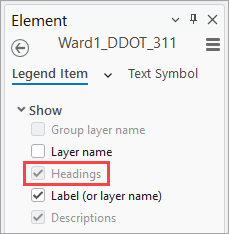
In an ArcGIS Pro layout, when viewing legend item properties for a single layer, the Headings check box in the Element pane is inactive.
Cause
The layer is set with single symbol as the primary symbology, which does not support legend headings. This method applies one symbol to all features and does not create symbol classes or groups. As a result, the Headings check box appears checked but is in active and cannot be modified. Headings are only available when supported by the layer’s symbology. Refer to ArcGIS Pro: Text display options for more information.
Solution or Workaround
Note:
This workaround alters the appearance of existing legend items.
The workaround to enable the Headings check box for a specific layer is to use a symbology type other than single symbol, wherein headings are supported. Refer to Steps 1 and 2 from this document, ArcGIS Pro: Apply symbology to feature layers, for instructions.
Article ID: 000037414
- ArcGIS Pro
Get support with AI
Resolve your issue quickly with the Esri Support AI Chatbot.


Related Information
Discover more on this topic

Search for related information

Find training related to this topic

Explore ideas and give feedback
Get help from ArcGIS experts
Start chatting now