
PROBLEM
Unable to create Parquet multifile feature connection in ArcGIS Pro
Description
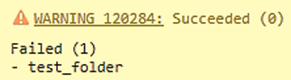
In ArcGIS Pro, a warning message is returned when a multifile feature connection of a Parquet file is created with nanosecond precision timestamps.
WARNING 120284: Succeeded (0)
Failed (1)
- <folder_name>
Cause
Parquet files with nanosecond precision timestamps are not supported in the GeoAnalytics Desktop tool. The tool only supports timestamps up to milliseconds. As a result, the Parquet file datasets with nanosecond timestamps go undetected and the warning is returned.
Solution or Workaround
Pre-requisites before attempting the workaround (for a successful multifile feature connection):
• Prepare the ArcGIS Pro Python cloned environment.
• Install and verify the required packages for Python, which include pandas, PyArrows, and fastparquets, in the Python shell (REPL) in the Python command prompt.
- Convert the existing Parquet file with nanosecond timestamp to a new Parquet file with a millisecond timestamp.
- Click the Start icon.
- Search and double click the Python Command Prompt.
- In the command prompt, type python and click Enter.
- Copy the following codes and paste them in the command prompt.
import pandas as pd # Path to the source Parquet file path = r"C:<parquet_file_path>" # Load the Parquet file into a Pandas DataFrame df = pd.read_parquet(path) # Convert nanosecond precision field to string with millisecond precision df['date_new'] = pd.to_datetime(df['<field_name>'], unit='ns').dt.floor('ms').dt.strftime('%Y-%m-%d %H:%M:%S.%f').str[:-3 # Remove the original nanosecond precision field df.drop('<field_name>', axis=1, inplace=True) # Save the updated DataFrame as a new Parquet file output = r"C:\data\updated_file.parquet" df.to_parquet(output, index=False) - Press Enter and ensure no error message is returned in the command prompt. Exit the command prompt by typing the exit code below.
exit()
- Re-establish the multifile feature connection of the updated Parquet file.
- Open the ArcGIS Pro project.
- On the Analysis ribbon, in the Geoprocessing group, click Tools.
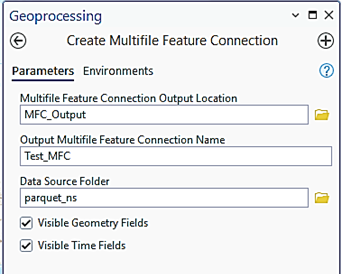
- In the Geoprocessing pane, search for and select Create Multifile Feature Connection.
- On the Parameters tab, for Multifile Feature Connection Output Location, browse to the output storage folder in File Explorer and select the folder.
- Specify a folder name for Output Multifile Feature Connection Output Name.
- For Data Source Folder, browse to the data folder in File Explorer and click the source folder.
- Check both the Visible Geometry Fields and Visible Time Fields checkboxes.
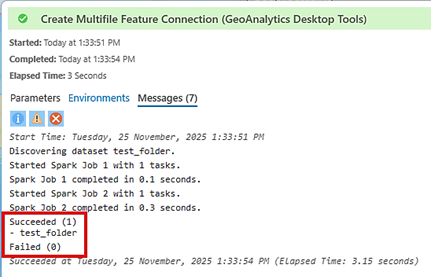
- Click Run. The image below shows the message returned in the GeoAnalytics Desktop Tools history.
- Add the folder containing the parquet file with millisecond timestamp to the project. Refer to ArcGIS Pro: Connect to an existing folder for more information.
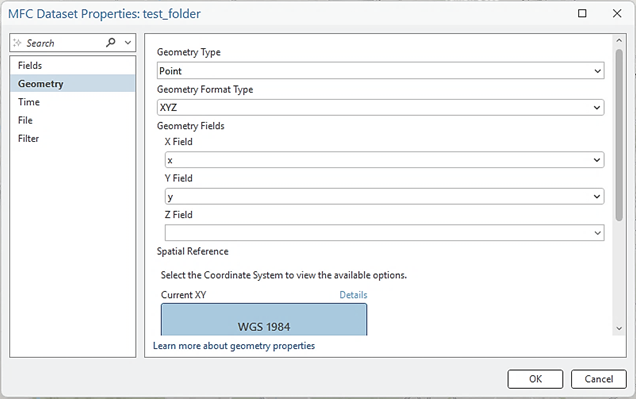
- In the Catalog pane, expand the output folder and right-click the multifile point feature class. Click Properties.
- On the Geometry tab, for GeometryType, select Point.
- For Geometry Format Type, select XYZ.
- Under Geometry Fields, select x for the X Field, y for the Y Field, and leave the Z field blank.
- For Spatial Reference, select WGS 1984 Coordinate System.
- Click OK.
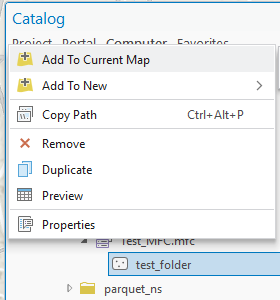
- In the Catalog pane, right-click the multifile point feature class and click Add to Current Map.
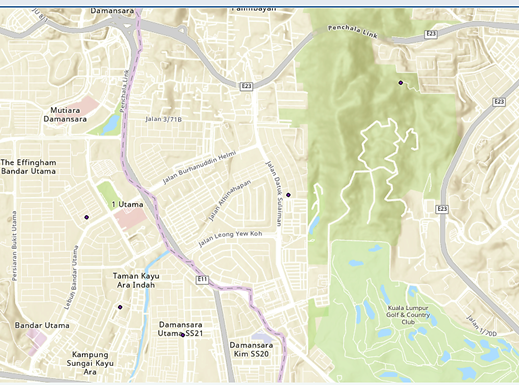
The map below shows the points properly displayed based on the X/Y coordinates provided in the Parquet file.
Article ID: 000038749
- ArcGIS Pro
Get support with AI
Resolve your issue quickly with the Esri Support AI Chatbot.


Related Information
Discover more on this topic

Search for related information

Find training related to this topic

Explore ideas and give feedback
Get help from ArcGIS experts
Start chatting now