
PROBLEM
Unable to create a Space Planner app in ArcGIS Indoors
Description
When attempting to create a Space Planner app in ArcGIS Indoors, one of the following error messages is returned:
Error:
Unable to create plan: There was an error creating your plan.
Unable to extract changes.
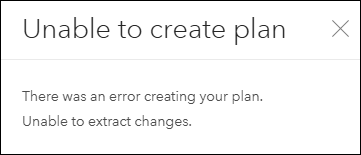
Error:
Unable to create plan: There was an error creating your plan.
Cannot read properties of undefined (reading 'layerServerGens')
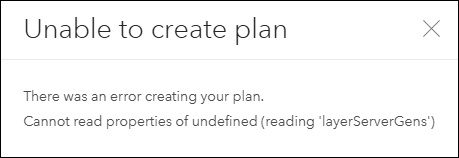
Cause
The following are possible causes for the error messages:
- The 'Keep track of changes to the data (add, update, delete features)' setting is disabled in ArcGIS Online.
- The existing ArcGIS Indoors data layer is overwritten in ArcGIS Online or ArcGIS Pro.
Solution or Workaround
Depending on the cause, use one of the workarounds below to resolve the issue:
Enable the Keep track of changes to the data (add, update, delete features) setting
If this setting is disabled for the feature layers used in the Space Planner app, the app is unable to create or manage space plans properly. Without editor tracking, the app is unable to record updates or synchronize edits. Refer to ArcGIS Online: Settings that control editing access for instructions to enable this setting.
Share a new web map
Share a new web map to ArcGIS Online and create a new Space Planner app. Refer to ArcGIS Indoors: Share a web map for use in Space Planner for instructions.
Article ID: 000036809
- ArcGIS Pro
- ArcGIS Online
- Configurable Web Apps
Get support with AI
Resolve your issue quickly with the Esri Support AI Chatbot.


Related Information
Discover more on this topic

Search for related information

Find training related to this topic

Explore ideas and give feedback
Get help from ArcGIS experts
Start chatting now