
PROBLEM
Unable to add new domains to feature class stored in ArcGIS Pro file geodatabase
Description
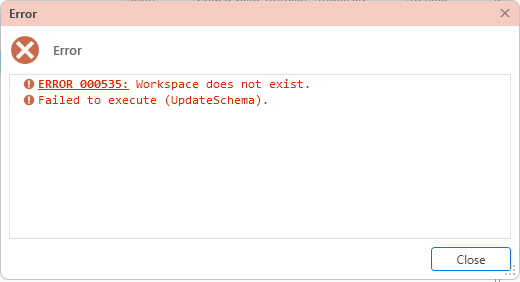
In ArcGIS Pro, when attempting to add a new domain to a feature class stored in a file geodatabase, the process fails and returns the following error messages:
Error:
ERROR 000535: Workspace does not exist.
Failed to execute (UpdateSchema).
Cause
This problem occurs when the root folder containing the file geodatabase has the .gdb extension in its name. The example below shows the file geodatabase containing the feature class is located inside another folder with the .gdb extension:
C:\Test20251103\Project.gdb\MyProject.gdb
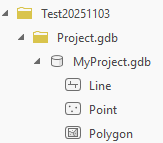
In the example above, ArcGIS Pro interprets the Project.gdb folder as a geodatabase. When the actual geodatabase (MyProject.gdb) resides inside the folder, the application fails to resolve the correct workspace path and returns error 000535.
Solution or Workaround
To resolve the issue, rename the root folder to remove the .gdb extension from its name.
Note:
For best practice, back up the geodatabase before renaming it.
- If ArcGIS Pro is open, save edits and exit the application.
- Navigate to the root folder located on the local machine. In this example, the root folder, Project.gdb is located at C:\Test20251103\.
- Rename the root folder to remove the .gdb extension. In this example, Project.gdb is renamed to Project.
File path with the original root folder name:
C:\Test20251103\Project.gdb\MyProject.gdb
File path with the edited root folder name:
C:\Test20251103\Project\MyProject.gdb
- Re-open ArcGIS Pro and access the file geodatabase through the edited folder path to add a new domain.
Note:
Renaming the folder from the Catalog pane in ArcGIS Pro returns the error message "Rename Failed: Access to the path <path> is denied", as ArcGIS Pro treats any folder with the .gdb extension as a file geodatabase.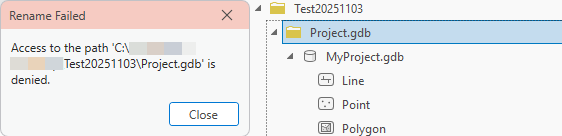
Article ID: 000038952
- ArcGIS Pro
Get support with AI
Resolve your issue quickly with the Esri Support AI Chatbot.


Related Information
Discover more on this topic

Search for related information

Find training related to this topic

Explore ideas and give feedback
Get help from ArcGIS experts
Start chatting now