
PROBLEM
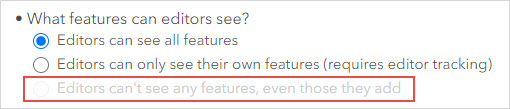
The 'Editors can't see any features, even those they add' option is disabled
Description
When attempting to enable the ‘Editors can’t see any features, even those they add’ option, the option is disabled.
Cause
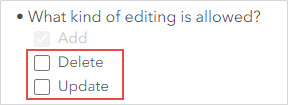
This is an expected behavior when the Update and Delete options under 'What kind of editing is allowed' are enabled in ArcGIS Online.
Solution or Workaround
- Log in to ArcGIS Online and click Content > My Content.
- Browse to and click the hosted feature layer.
- On the item details page, click the Settings tab.
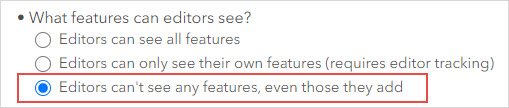
- Scroll down to the Feature Layer (hosted) section, under What kind of editing is allowed?, uncheck the Delete and Update check boxes.
The 'Editors can't see any features, even those they add' option is now available.
Article ID: 000030195
Software:
- ArcGIS Online
Get support with AI
Resolve your issue quickly with the Esri Support AI Chatbot.


Related Information
Discover more on this topic

Search for related information

Find training related to this topic

Explore ideas and give feedback
Get help from ArcGIS experts
Start chatting now