
PROBLEM
Selected records not triggering map actions in ArcGIS Experience Builder
Description
In ArcGIS Experience Builder, when interacting with records using widgets such as the Query or Table widget, the 'Pan to', 'Zoom to', and 'Show on map' actions do not trigger any response in the Map widget. Although query results are returned and records are displayed correctly, selecting a record does not prompt the expected interaction with the map.
Cause
This issue occurs when the Shape field is hidden in the feature layer's attribute table in ArcGIS Pro before it is published as a referenced map image layer to the ArcGIS Enterprise portal. Because map image layers rely on the Shape field to return feature locations, hiding this field prevents the service from providing the geometry required for spatial interactions. As a result, when the web map used in the Map widget contains a map image layer with the Shape field hidden, Experience Builder cannot locate the features, causing map actions to fail.
Solution or Workaround
Show the Shape field in the feature layer's attribute table
- Open the ArcGIS Pro project containing the feature layer.
- Open the fields view of the feature layer.
- In the fields view, check the Visible check box for the Shape field.
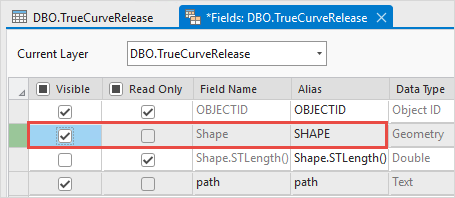
- On the top ribbon, click Save in the Manage Edits group to save the edits.
- Overwrite the map image layer. Refer to ArcGIS Pro: Overwrite a map image layer for instructions.
Use a feature layer in the web map
Configure the web map in the Map widget to use a feature layer instead of a map image layer. Feature layers provide access to geometry even when the Shape field is hidden. Refer to Portal for ArcGIS: Get started creating maps (Map Viewer) for instructions.
Article ID: 000036359
- ArcGIS Pro
- ArcGIS Experience Builder
Get support with AI
Resolve your issue quickly with the Esri Support AI Chatbot.


Related Information
Discover more on this topic

Search for related information

Find training related to this topic

Explore ideas and give feedback
Get help from ArcGIS experts
Start chatting now