
PROBLEM
Multiple XY providers automatically added to Locators folder in ArcGIS Pro
Description
In some existing ArcGIS Pro projects, opening a new map in the Map container from the Catalog pane automatically adds a new XY provider to the Locators folder. This issue persists in most map-related actions, for instance, opening or closing a map in the Catalog pane or switching between map views. As more XY provider locators are added, the ArcGIS Pro performance becomes slower.
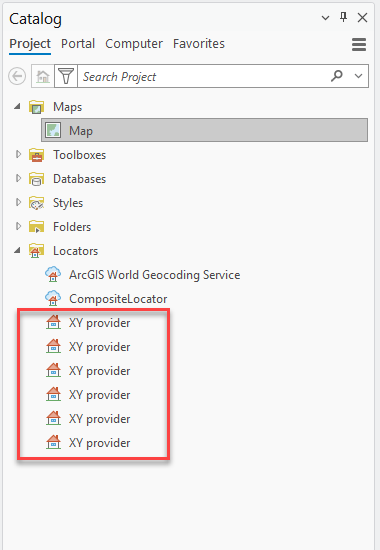
The issue does not occur in a newly created project using the same data. However, it reoccurs when a map file exported from an affected project is imported into a new project.
Cause
The issue is caused by migrating existing ArcGIS Pro projects and data from one environment to another, such as from ArcGIS Pro to Amazon Web Services (AWS) Cloud. These projects contain multiple references to the default XY provider, including references to the legacy network drive and the legacy ArcGIS Enterprise portal. During this migration, the legacy path references for default locators are retained alongside the new paths, resulting in multiple locator path references saved with the ArcGIS Pro projects.
Solution or Workaround
Remove the legacy path references from the default locator
Note:
This workaround is not applicable to a zipped project file with the .aprx extension. The XY provider is a default locator built into ArcGIS Pro and cannot be modified from the project backend, as it does not have an accessible storage path.
- Open the affected file, such as a layer (.lyrx), map (.mapx), or layout (.pagx) file using Notepad++.
- Browse to the folder with the affected file on the local machine.
- Right-click the file and select Edit with Notepad++.
- In the Notepad++ editor window, navigate to "type" : "CIMLocator" to identify and remove all legacy path references. Retain only the correct path.
- Save the file.
- In ArcGIS Pro, open the project. Refer to ArcGIS Pro: Open a project for more information.
Create a new project and add the data
Create a new project in ArcGIS Pro and add the same data to the project. Refer to ArcGIS Pro: Add data to a project for more information. Save and reopen the project. This method ensures the project is rebuilt without legacy path references that cannot be removed from the original project file.
Article ID: 000034973
- ArcGIS Pro
Get support with AI
Resolve your issue quickly with the Esri Support AI Chatbot.


Related Information
Discover more on this topic

Search for related information

Find training related to this topic

Explore ideas and give feedback
Get help from ArcGIS experts
Start chatting now