
PROBLEM
Map legend displays as carousel in the ArcGIS Instant Apps Basic (Media Map) template
Description
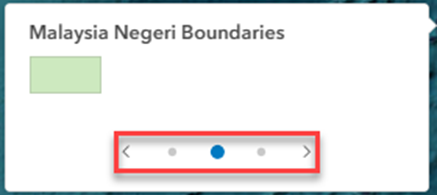
When viewing the map legend in the ArcGIS Instant Apps Basic (Media Map) template, it displays the legend items in a carousel. The legend displays only one item at a time, requiring multiple clicks to view all items. Because the carousel cycles endlessly without indicating the first or last item, it is difficult to identify the total number of legend items available, as shown in the horizontal legend below.
Cause
This is expected behavior. When the legend is enabled, the legend style is set to Card and the layout option is set to Auto, which applies the Stack layout. This configuration prioritizes a compact, mobile-friendly presentation but results in paginated slides when multiple legend items are present.
Solution or Workaround
To display the map legend in a non-carousel format, disable the Express mode and change the legend style.
- Log in to ArcGIS Instant Apps.
- On the Instant Apps home page, click the My Apps tab.
- Navigate to the app card and click Configure.
- In the configuration panel, toggle Express off to access the app's full setup mode.
- In the Turn off express mode window, click Continue.
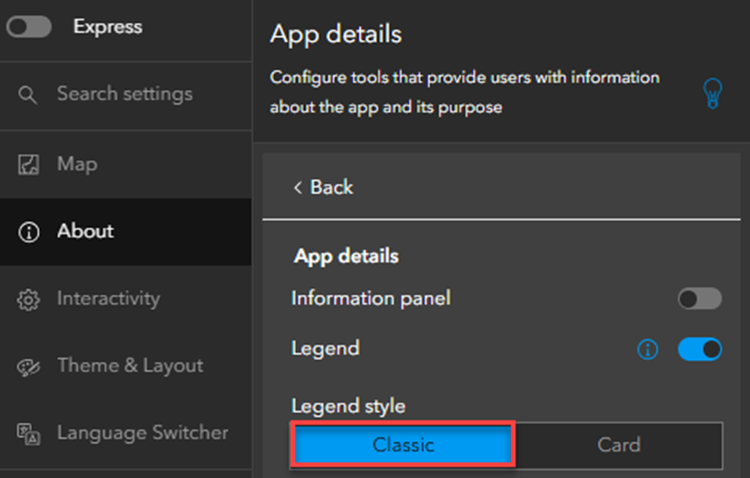
- Click About > App details.
- Under Legend style, click Classic.
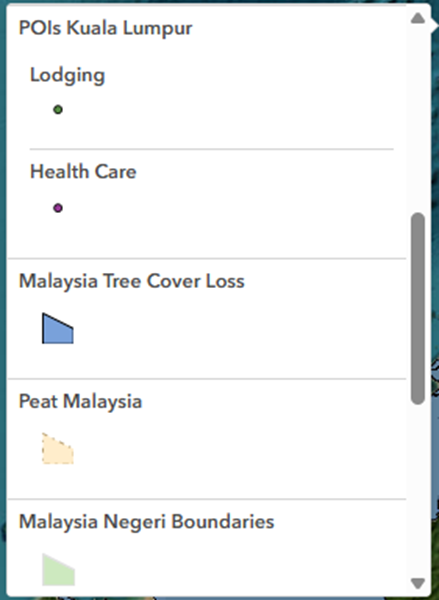
The vertical legend below displays a scrollable list of legend items.
Note:
Optionally, when using the Card legend style, change the layout option to display legend items horizontally within a single panel instead of across multiple panels. Under Layout option, expand the drop-down menu and select Side by side.
Article ID: 000039676
- Configurable Web Apps
Get support with AI
Resolve your issue quickly with the Esri Support AI Chatbot.


Related Information
Discover more on this topic

Search for related information

Find training related to this topic

Explore ideas and give feedback
Get help from ArcGIS experts
Start chatting now