
PROBLEM
Embedded dashboard does not display mobile view correctly in ArcGIS Experience Builder
Description
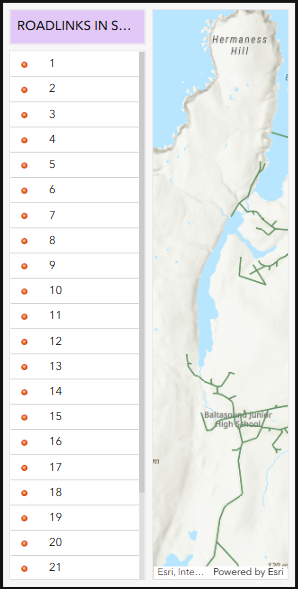
When previewing an embedded dashboard in an ArcGIS Experience Builder web experience in a browser using the small-screen device view button, the mobile view configured in ArcGIS Dashboards does not display correctly. Instead, the large-screen view appears truncated, as shown in the image below.
Cause
The Embed widget in ArcGIS Experience Builder does not automatically display the configured mobile view of an embedded dashboard when the web experience is accessed from a desktop.
Solution or Workaround
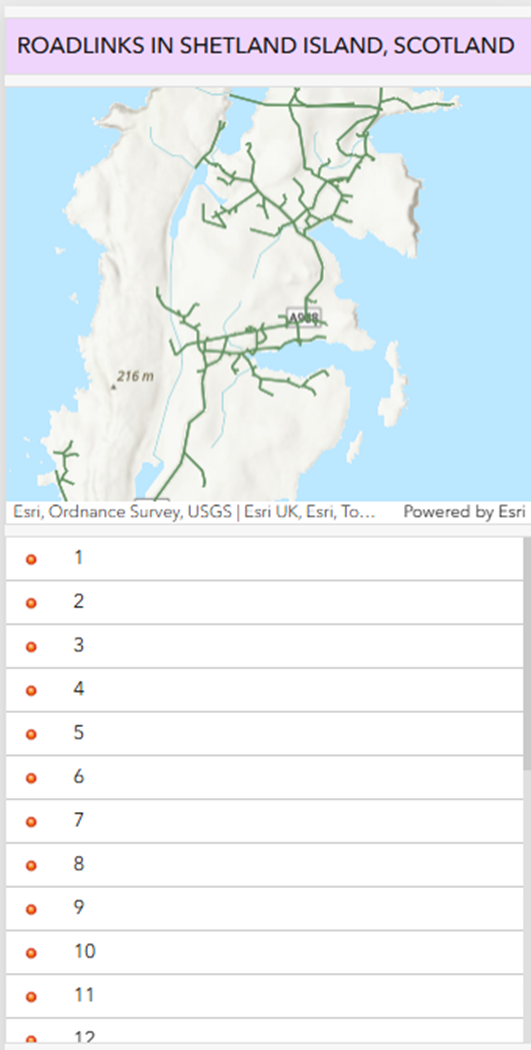
To preview an embedded dashboard in an ArcGIS Experience Builder web experience, it must be accessed on a mobile device. The mobile view of an embedded dashboard in the Embed widget is only recognized when the experience is opened on a mobile device, providing an optimized layout for smaller screens that improves readability and usability.
Use the QR code to test both the draft and published versions on a mobile device before sharing the app. This helps verify that the layout, embedded content, and mobile views display as intended. Refer to ArcGIS Experience Builder: Save, preview, and publish for more information.
The image below shows the embedded dashboard displays correctly in ArcGIS Experience Builder on a mobile device.
Article ID: 000037812
- ArcGIS Experience Builder
- ArcGIS Dashboards
Get support with AI
Resolve your issue quickly with the Esri Support AI Chatbot.


Related Information
Discover more on this topic

Search for related information

Find training related to this topic

Explore ideas and give feedback
Get help from ArcGIS experts
Start chatting now