
PROBLEM
Download option unavailable for KML in ArcGIS Enterprise portal and ArcGIS Online
Description
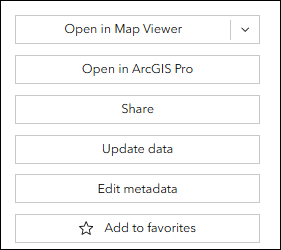
KML files in the ArcGIS Enterprise portal and ArcGIS Online are widely used for data visualization, integration with web maps, and adding annotations. However, these platforms occassionally do not display the Download option to download the KML files for further use. This limitation affects data accessibility, prevents offline use, and limits sharing and integration across different GIS platforms.
Cause
KML files added to ArcGIS Online or the ArcGIS Enterprise portal are stored as item files and are not published as hosted or non-hosted feature layers. As a result, they do not consistently expose the standard Download option available for feature layer items. Refer to Portal for ArcGIS: KML and ArcGIS Online: KML for more information.
Solution or Workaround
Download the KML through ArcGIS Online
- Log in to ArcGIS Online and click Content > My Content.
- Navigate to the KML file, click Options and select View details.
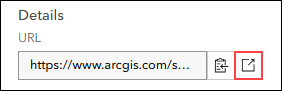
- On the Overview tab, scroll to the Details section and under URL, click View. The KML file downloads automatically.
Download the KML through the ArcGIS Enterprise portal
- Log in to the ArcGIS Enterprise portal and click Content > My Content.
- Navigate to the KML file, click Options and select View details.
- On the Overview tab, share the file with the public. Refer to Portal for ArcGIS: Share items with everyone for instructions.
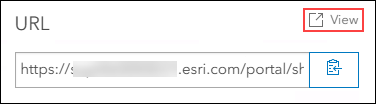
- On the Overview tab, scroll to URL, and click View. The KML file automatically downloads.
Note:
Access to the KML file via the URL requires sufficient privileges. If the item is not shared publicly or the account does not have the required permissions, clicking View will redirect to the ArcGIS Portal Directory login page. After successful authentication, the KML file will download automatically.

Article ID: 000039512
- ArcGIS Pro
- Portal for ArcGIS
- ArcGIS Enterprise
Get support with AI
Resolve your issue quickly with the Esri Support AI Chatbot.


Related Information
Discover more on this topic

Search for related information

Find training related to this topic

Explore ideas and give feedback
Get help from ArcGIS experts
Start chatting now