
PROBLEM
ArcGIS Pro is unable to detect latitude and longitude fields in a Parquet file
Description
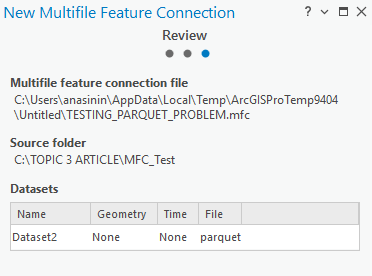
When a Parquet file is added to ArcGIS Pro through a multifile feature connection, the latitude and longitude fields are not recognized as coordinate fields. Because the fields are stored as strings and no geometry is defined, the data is displayed as a non-spatial table and cannot be drawn on the map.
Cause
The Parquet file is created outside ArcGIS Pro and does not contain geometry information. The latitude and longitude values are stored as string fields instead of numeric coordinates; thus, ArcGIS Pro is unable to interpret the fields as spatial data when accessed through multifile feature connection tools.
Solution or Workaround
Note:
Ensure the following requirements are met to successfully work with latitude and longitude fields:
• Prepare the ArcGIS Pro Python cloned environment.
• Install and verify the required library packages in Python, which include pandas, pyarrow, fastparquet, and openpyxl in the Python shell (REPL) in the ArcGIS Pro Python Command Prompt. Refer to Topcoder: Excel automation with openpyxl in Python for more information.
• Ensure Microsoft Access Database Engine (ACE) drivers are installed. This enables ArcGIS Pro to read the Excel file converted from the Parquet file. Refer to ArcGIS Pro: Install the drivers to work with Microsoft Excel files for more information.
- Convert the Parquet file that contains latitude and longitude fields to an Excel file.
- Click the Start icon.
- Search and double-click the Python Command Prompt.
- In the command prompt, type python and click Enter.
- Copy the following codes and paste them in the command prompt.
import pandas as pd # Change this path to the relevant folder and Parquet file folder_path = r"C:\FOLDER_NAME\SUBFOLDER\ERROR\Name_of_Dataset\yourparquetfile.parquet" # Read the Parquet file df = pd.read_parquet(folder_path, engine="pyarrow") # Rename columns (adjust if the columns have different names) df = df.rename(columns={"Lat": "Latitude", "Long": "Longitude"}) # Convert Latitude and Longitude to numeric values df["Latitude"] = pd.to_numeric(df["Latitude"], errors="coerce") df["Longitude"] = pd.to_numeric(df["Longitude"], errors="coerce") # Remove rows with missing or invalid coordinates df = df.dropna(subset=["Latitude", "Longitude"]) df = df[(df["Latitude"].between(-90, 90)) & (df["Longitude"].between(-180, 180))] # Save as Excel file for ArcGIS Pro # The output file will be created in the same folder as your Parquet file excel_path = folder_path.replace(".parquet", "_fixed.xlsx") df.to_excel(excel_path, index=False, engine="openpyxl") print(f"Fixed file created:\n{excel_path}") - Press Enter and ensure no error message is returned in the ArcGIS Python Command Prompt. Exit the command prompt by typing the Python code below.
exit()
- In the Catalog pane, right-click Folders, click Add Folder Connection, and select the folder used to store the Excel file.
- Expand the folder added in Step 3, right-click the Excel sheet, hover over Data Design and click Fields.
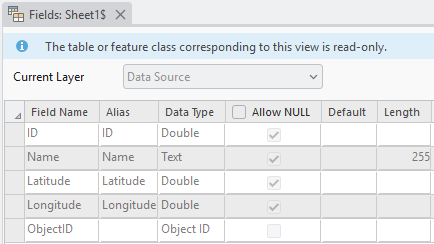
- Check the Field Name and Data Type of the latitude and longitude of the Excel file. Ensure the data type is Double for both the latitude and longitude fields.
The image below shows the latitude and longitude fields are detected as coordinate fields with the data type 'Double' in ArcGIS Pro.
Article ID: 000036825
- ArcGIS Pro
Get support with AI
Resolve your issue quickly with the Esri Support AI Chatbot.


Related Information
Discover more on this topic

Search for related information

Find training related to this topic

Explore ideas and give feedback
Get help from ArcGIS experts
Start chatting now