
PROBLEM
Arcade expression used to create saved symbology not preserved in ArcGIS Pro
Description
In ArcGIS Pro, the Arcade expression used to create the saved symbology is not preserved when it is saved to a style file. Dynamic visualizations, calculations, or conditional formatting defined through the Arcade expression are not retained, limiting the reuse of complex symbology across layers or projects.
Cause
This is by design. Style files only save the resulting symbology, such as colors and size, created by the expression. The Arcade expression is not saved, as it functions as the renderer used to generate the symbology. As a result, custom expressions for symbology are not preserved.
Solution or Workaround
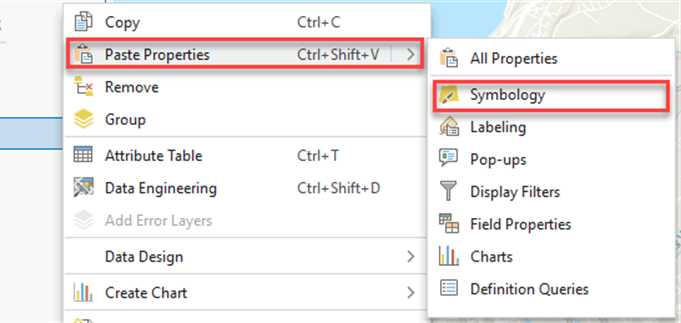
Copy and paste the saved symbology
Use the copy and paste properties to apply the saved symbology. Click Symbology properties on the target layer to paste the symbology copied from the layer containing the Arcade expression. Refer to ArcGIS Pro: Copy a subset of properties for instructions.
Save the symbology as a layer file
Saving the symbology to a layer file allows the Arcade expression to be transfered when it is imported to another layer. Layer files retain full symbology configurations, including Arcade expressions. Refer to ArcGIS Pro: Save a layer file for more information.
Article ID: 000039047
- ArcGIS Pro
Get support with AI
Resolve your issue quickly with the Esri Support AI Chatbot.


Related Information
Discover more on this topic

Search for related information

Find training related to this topic

Explore ideas and give feedback
Get help from ArcGIS experts
Start chatting now