
PROBLEM
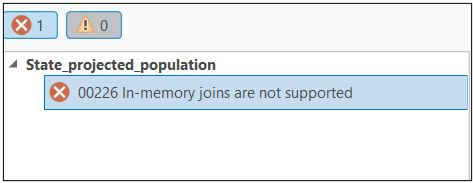
In-memory joins are not supported when sharing a layer as a web feature layer
Description
In ArcGIS Pro, performing a join on a layer in a map creates an in-memory join. These joins cannot be shared directly as web feature layers. To share the data, export the joined layer to a new feature class, create a relationship class, use a database view, or remove the join.
Cause
Sharing a web feature layer fails if it contains in-memory joins, because these joins are not supported for web publishing in ArcGIS Pro.
Solution or Workaround
Solution 1 – Create a Relationship Class
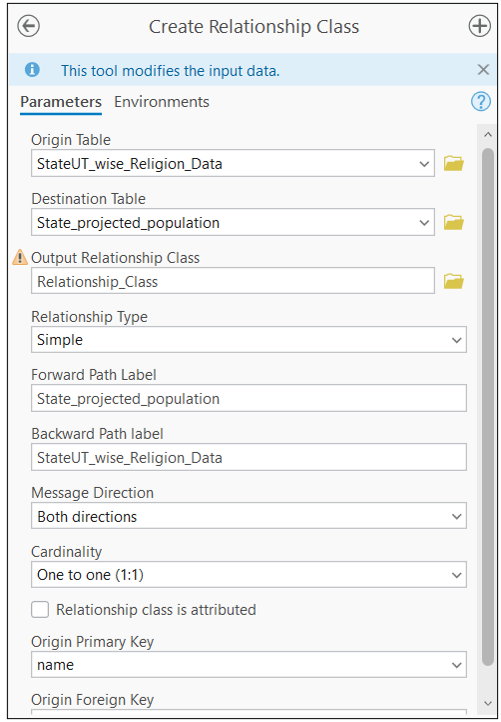
If the joined layer and the source layer (the layer from which the join is created) are stored in the same geodatabase, create a relationship class between the datasets instead of using an in-memory join.
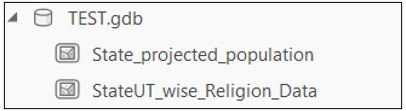
Example: If the State_projected_population and StateUT_wise_Religion_Data datasets are stored in the same geodatabase (TEST.gdb), use the Create Relationship Class tool instead of performing an Add Join to establish a connection between them.
Solution 2 – Export the Joined Layer
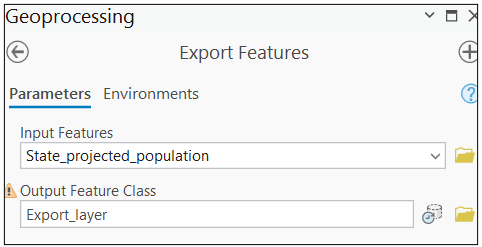
Export the joined layer to a new feature class, and use this new feature class in the map.
- In the Contents pane, select the joined layer.
- On the Feature Layer tab, click the Data tab.
- In the Export group, click Export Features.
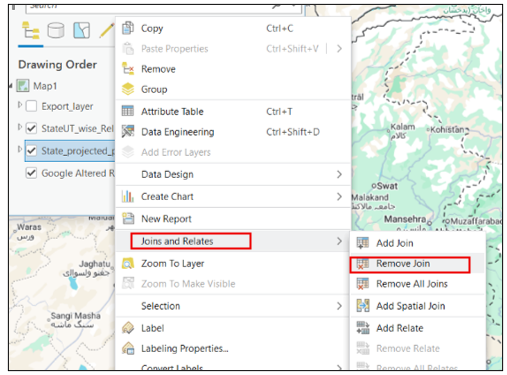
Solution 3 – Remove the Join
Remove the join from the layer before sharing.
- In the Contents pane, right-click the layer or table.
- Point to Joins and Relates.
- Click Remove Join (or Remove All Joins to remove all existing joins).
Article ID: 000037634
- ArcGIS Pro
Get support with AI
Resolve your issue quickly with the Esri Support AI Chatbot.


Related Information
Discover more on this topic

Search for related information

Find training related to this topic

Explore ideas and give feedback
Get help from ArcGIS experts
Start chatting now