
PROBLEM
In ArcGIS Notebook Services on Kubernetes at 11.5, notebooks automated jobs (tasks, webtools and webhooks) do not work after restarting the cluster
Description
In ArcGIS Notebook Services on Kubernetes 11.5, restarting the cluster can lead to the Notebook Automation Manager becoming non-functional. As a result, automation jobs will not automatically resume, and tasks along with webtools and webhooks may fail to execute properly. Consequently, tasks will continue to be skipped, webtools will remain inactive and webhooks won't trigger.
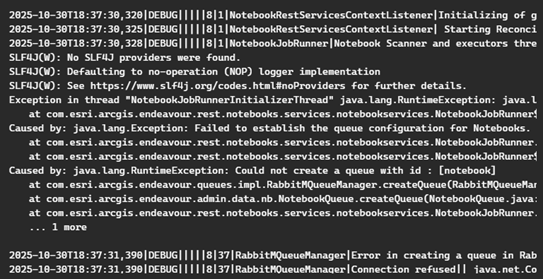
Below is an excerpt of an example of the error:
2025-10-30T18:37:30,320|DEBUG|||||8|1|NotebookRestServicesContextListener|Initializing of gisServerManager completed||
2025-10-30T18:37:30,325|DEBUG|||||8|1|NotebookRestServicesContextListener| Starting Reconciliation Loop in Notebooks Automation Service - Notebooks Handler||
2025-10-30T18:37:30,328|DEBUG|||||8|1|NotebookJobRunner|Notebook Scanner and executors thread are ready||
SLF4J(W): No SLF4J providers were found.
SLF4J(W): Defaulting to no-operation (NOP) logger implementation
SLF4J(W): See https://www.slf4j.org/codes.html#noProviders for further details.
Exception in thread "NotebookJobRunnerInitializerThread" java.lang.RuntimeException: java.lang.Exception: Failed to establish the queue configuration for Notebooks. To determine the cause and address this issue, review curated organization warnings and cluster events.
     at com.esri.arcgis.endeavour.rest.notebooks.services.notebookservices.NotebookJobRunner$InitializerThread.run(NotebookJobRunner.java:182)
Caused by: java.lang.Exception: Failed to establish the queue configuration for Notebooks. To determine the cause and address this issue, review curated organization warnings and cluster events.
     at com.esri.arcgis.endeavour.rest.notebooks.services.notebookservices.NotebookJobRunner.a(NotebookJobRunner.java:143)
     at com.esri.arcgis.endeavour.rest.notebooks.services.notebookservices.NotebookJobRunner$InitializerThread.run(NotebookJobRunner.java:179)
Caused by: java.lang.RuntimeException: Could not create a queue with id : [notebook]
     at com.esri.arcgis.endeavour.queues.impl.RabbitMQueueManager.createQueue(RabbitMQueueManager.java:70)
     at com.esri.arcgis.endeavour.admin.data.nb.NotebookQueue.createQueue(NotebookQueue.java:171)
     at com.esri.arcgis.endeavour.rest.notebooks.services.notebookservices.NotebookJobRunner.a(NotebookJobRunner.java:139)
... 1 more

2025-10-30T18:37:31,390|DEBUG|||||8|37|RabbitMQueueManager|Error in creating a queue in RabbitMQ using connection info {"connectionString":"{\"queueId\":\"notebook\",\"hostname\":\"arcgis-queue-store\"}","password":"f7w2tnfnyl","tlsPort":5671,"port":5672,"sslEnabled":true,"type":"RABBITMQ","username":"v73yqjtd7b"}||
2025-10-30T18:37:31,390|DEBUG|||||8|37|RabbitMQueueManager|Connection refused|| java.net.ConnectException: Connection refused
Solution or Workaround
To circumvent this issue, refresh the Jobs Manager and Notebook Automation Manager deployments to restore normal operation.
To refresh Jobs Manager
- Go to: https://FQDN.esri.com/<context>/admin/system/deployments
- Search for the ‘job-manager’ deployment.
- Under Supported Operations, click Refresh Deployment.
To refresh Notebook Automation Manager
- Go to https://FQDN.esri.com/<context>/manager/
- Go to System > Notebook automation service.
- Open the Settings tab and click Refresh Deployment.
Article ID: 000039349
- ArcGIS Enterprise on Kubernetes
- ArcGIS Enterprise 11 5
Get support with AI
Resolve your issue quickly with the Esri Support AI Chatbot.


Discover more on this topic

Search for related information

Find training related to this topic

Explore ideas and give feedback
Get help from ArcGIS experts
Start chatting now