
HOW TO
Retain related records in pop-ups when publishing a feature layer to ArcGIS Online
Summary
When publishing a feature layer from ArcGIS Pro that includes pop-ups configured to display related records, users may encounter an issue where these pop-ups are not retained in the resulting hosted feature layer on ArcGIS Online. This requires additional configuration in ArcGIS Online to restore the intended pop-up behavior.
This article describes a workflow to ensure that related records configured in pop-ups within ArcGIS Pro are preserved when the layer is published to ArcGIS Online. This procedure eliminates the need for manual reconfiguration and improves data presentation consistency across platforms.
Procedure
- Create a relationship class between the feature layer and the related table. This is essential for enabling related record visibility in pop-ups.
- Configure popups in ArcGIS Pro to include related records for the layer and the table.
- Save the map with only the feature layer and the related table included.
- Share As Web Map:
Use the Share as Web Map option in ArcGIS Pro. This action:- Publishes the map to ArcGIS Online
- Automatically creates a hosted feature layer in your ArcGIS Online content
- Open the Web Map in ArcGIS Online Map Viewer.
- Verify that the pop-ups in the Map Viewer correctly display related records as configured in ArcGIS Pro.
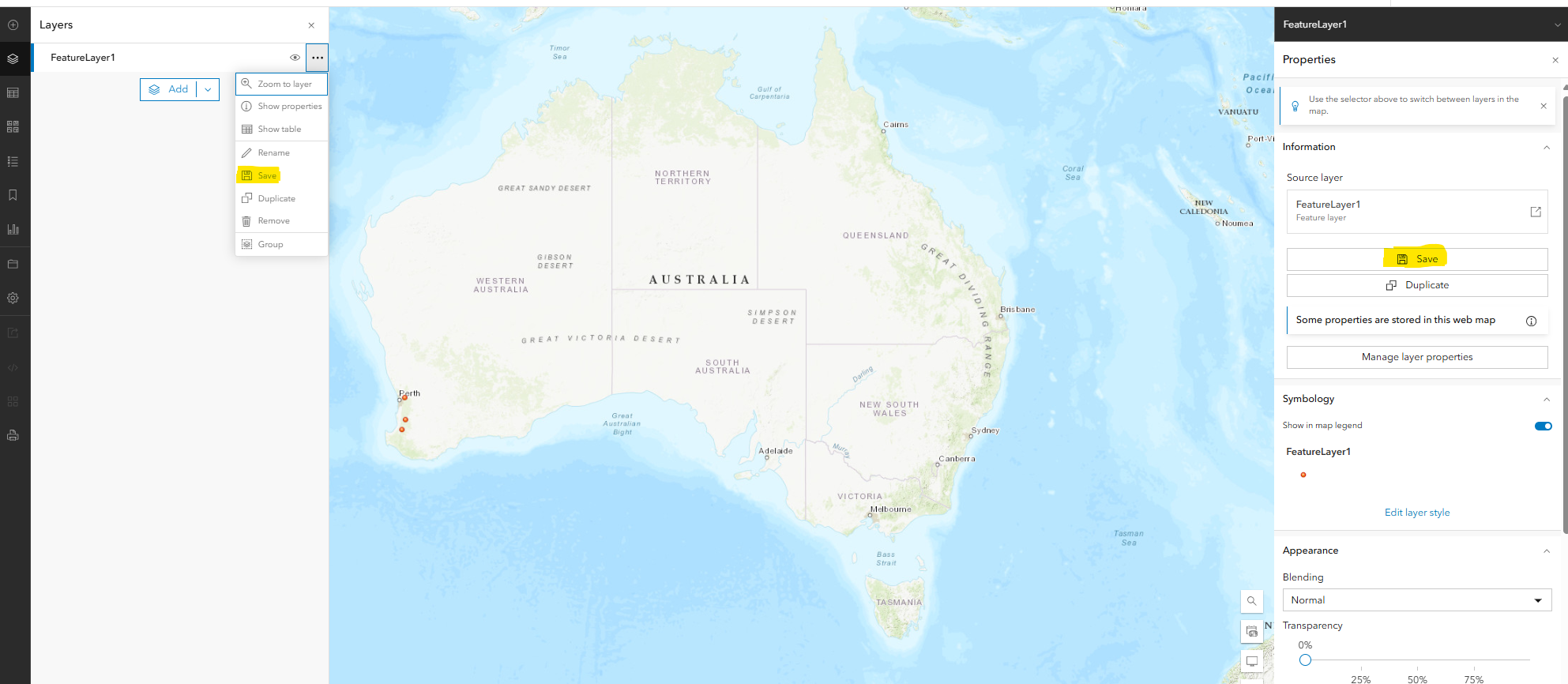
- Save the Layer Configuration.
- Click the three dots next to the layer in the Map Viewer, or by going through the Properties, and select Save, as shown in the image below. This step saves the pop-up configuration to the hosted feature layer, ensuring it persists across sessions and uses.
Article ID: 000037125
- ArcGIS Pro
- ArcGIS Online
Get support with AI
Resolve your issue quickly with the Esri Support AI Chatbot.


Discover more on this topic

Search for related information

Find training related to this topic

Explore ideas and give feedback
Get help from ArcGIS experts
Start chatting now