
HOW TO
Re-create the container registry secret used by ArcGIS Enterprise on Kubernetes
Summary
A container registry is a centralized repository used to store, manage, and distribute container images. These container images package the ArcGIS Enterprise components and their dependencies into portable, consistent units that can be deployed on Kubernetes clusters.
ArcGIS Enterprise on Kubernetes uses the Docker container registry to store and manage the container images that make up the ArcGIS Enterprise deployment.
A container registry is essential for managing the lifecycle of container images that run ArcGIS Enterprise on Kubernetes, enabling efficient, scalable, and secure deployment and updates of GIS services.
When deploying ArcGIS Enterprise on Kubernetes, the container registry host details and credentials must be provided. By default, Kubernetes stores and accesses this account's unencrypted credentials as a secret.
Using the ArcGIS Enterprise Manager, the credentials used to access the container registry can be updated after deployment. This is useful in scenarios where the password is frequently updated to meet certain security requirements.
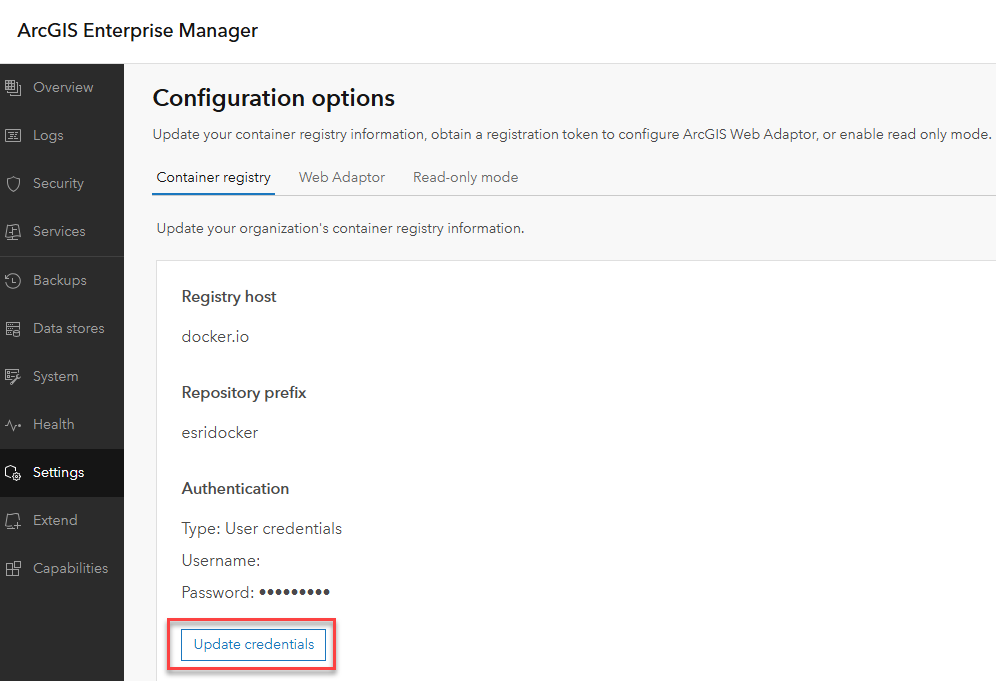
In some circumstances, after updating the password, it has been observed that ArcGIS Enterprise on Kubernetes is no longer able to access the container registry. When this happens, pods can no longer be pulled from the container registry.
Using the kubectl command: kubectl get pods -n arcgis to get a list of pods, the following pod states are seen for any new pods that are pulled from the container registry:
- ImagePullBackOff
- ErrImagePull
When attempting to apply patches, the following errors are observed:
"The following container images are not available or accessible: xxxxx. Ensure these images are accessible in your container registry before applying this upgrade."
Procedure
Re-create the container registry secret and re-create the pods that failed to deploy using the following workflow:
- Delete the existing secret for the container registry credentials using the following kubectl command:
kubectl delete secret arcgis-container-registry --namespace xxxxxxx
- Re-create the container registry secret using the following kubectl command:
create secret docker-registry arcgis-container-registry --docker-server=docker.io --docker-username=xxxxxx --docker-password=xxxxxxxx; --namespace xxxxxxx
- Delete pods with a status of ImagePullBackOff and ErrImagePull using the following kubectl command:
kubectl delete pod xxxxxxx -n xxxxxx
Article ID: 000039996
- ArcGIS Enterprise on Kubernetes
Get support with AI
Resolve your issue quickly with the Esri Support AI Chatbot.


Related Information
Discover more on this topic

Search for related information

Find training related to this topic

Explore ideas and give feedback
Get help from ArcGIS experts
Start chatting now