
HOW TO
Re-establish the relationship class for geodatabase attachments in ArcGIS Pro
Summary
When attachments are enabled on a geodatabase feature class, ArcGIS Pro automatically creates a relationship class linking the feature class to the associated attachment table. If this relationship class is deleted, it cannot be restored by manually recreating a new relationship class or re-enabling attachments. Once removed, the connection between the feature class and the attachment table is broken, and new attachments can no longer be added.
This article describes the workflow to re-establish the relationship class between a feature class and the attachment table to restore full attachment functionality.
Cause
This issue occurs when the map image layer containing the feature layer is not shared with the same group. Feature layers published from a map service with feature access enabled depend on the map image layer for access and display. If the map image layer is not shared with the group, members cannot access the corresponding feature layers in ArcGIS Field Maps, even if the feature layers are shared separately. Refer to Portal for ArcGIS: Share items for more information.
Procedure
- Open the ArcGIS Pro project containing the feature class.
- In the Catalog pane, copy the feature class to the same geodatabase. The copied feature class is renamed with a '_1' suffix.
- Use the Enable Attachments tool to enable attachments for the new feature class. Refer to ArcGIS Pro: Find a geoprocessing tool for instructions to find and use the geoprocessing tool.
- In the Catalog pane, right-click the ATTACH table of the new feature class and click Load Data.
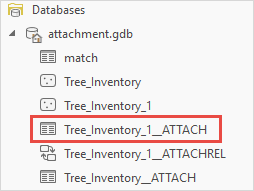
- In the Append pane, for Input Datasets, click Browse.
- In the Input Datasets dialog box, navigate to and select the original feature class ATTACH table. Click OK.
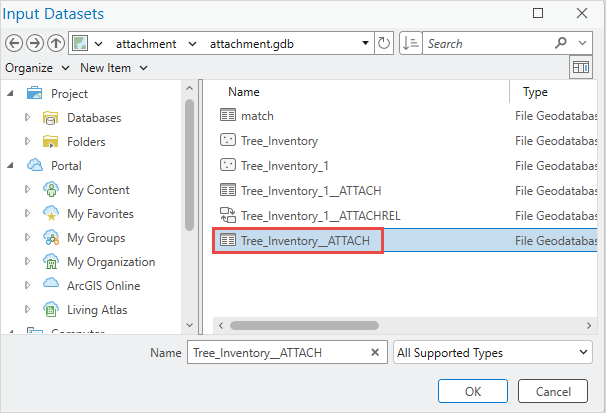
- In the Append pane, click Run.
The relationship class is re-established, linking the new feature class to its attachment table and restoring full attachment functionality.
Article ID: 000038921
- ArcGIS Pro
Get support with AI
Resolve your issue quickly with the Esri Support AI Chatbot.


Related Information
Discover more on this topic

Search for related information

Find training related to this topic

Explore ideas and give feedback
Get help from ArcGIS experts
Start chatting now