
HOW TO
Create collapsible sections in ArcGIS Online or Enterprise Map Viewer pop-ups
Summary
In ArcGIS Enterprise or ArcGIS Online Map Viewer, collapsible sections in pop-ups help organize additional information that is not required for immediate viewing when loading data. This approach enhances readability by reducing clutter in the pop-ups and improves the user experience by allowing on-demand access to the information.
This article describes the workflow to create collapsible sections in pop-ups by using HTML in the ArcGIS Enterprise portal and ArcGIS Online Map Viewer.
Procedure
- Log in to the ArcGIS Enterprise portal or ArcGIS Online and open the web map in Map Viewer.
- In Map Viewer, on the Settings (light) toolbar, click Pop-ups
 .
. - In the Pop-ups pane, click Add content and select Text.
- In the text editor, click Source
 .
. - Configure the HTML codes using the <details> tags for each section.
Below is an example of the HTML code for creating two collapsible sections in Map Viewer.
<details>
    <summary>Road length: [click to expand]</summary>
    <p>
        {length}
    </p>
</details>
<details>
    <summary>Road type: [click to expand]</summary>
    <p>
        {formOfWay}
    </p>
</details>
- Click Source. The table is displayed in the text editor.
- Click OK to close the text editor.
- On the Contents (dark) toolbar, click Save and open > Save to save the modifications.
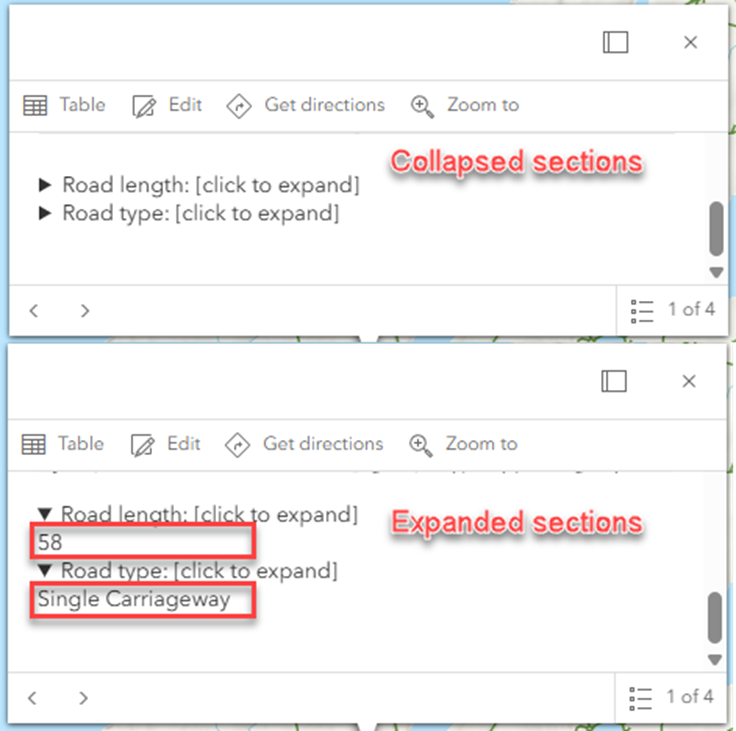
The image below shows the collapsed and expanded sections in the Map Viewer pop-up.
Article ID: 000036822
- ArcGIS Online
- Portal for ArcGIS
- ArcGIS Enterprise
Get support with AI
Resolve your issue quickly with the Esri Support AI Chatbot.


Related Information
Discover more on this topic

Search for related information

Find training related to this topic

Explore ideas and give feedback
Get help from ArcGIS experts
Start chatting now