
HOW TO
Convert the 24-hour time format string value to the 12-hour format in Portal for ArcGIS and ArcGIS Online Map Viewer
Summary
At times, it is necessary to convert the 24-hour time format string values to the 12-hour format (AM or PM). However, it is time-consuming if the data provided is large, as shown in the image below. This is resolved by using an Arcade expression to populate the data in the attribute table. This article provides the steps to convert the 24-hour time format string values to a 12-hour format using an Arcade expression in Portal for ArcGIS and ArcGIS Online Map Viewer.

Procedure
Note:
This workflow only applies to time data in a text field. For time data in a date field, use the Convert Time Field (Data Management) tool in ArcGIS Pro to convert the date field to a text field.
- Log in to Portal for ArcGIS or ArcGIS Online and click Content > My Content.
- Browse to and click the hosted feature layer to open the item details page.
- Click the Data tab to show the table.
- Convert the time to the 12-hour format using an Arcade expression.
- Click the field header of the time field, and select Calculate from the drop-down list. Click Arcade.
- Copy and paste the following Arcade expression into the Expression box. Replace <TIME_FIELD> with the name of the time field. Click Test.
var t = ($feature.<TIME_FIELD>)

var h = Number(Split(t, ":", 2)[0]);
var m = Split(t, ":", 2)[1];
var AMPM = When(
h > 12, h - 12,
h == 0, 12,
h );
var suffix = When(
h == 24, " AM",
h >= 12, " PM",
" AM" );
Concatenate( [ AMPM, m ], ":" ) + suffix;

- When the Results tab displays the time in the 12-hour format, click OK.

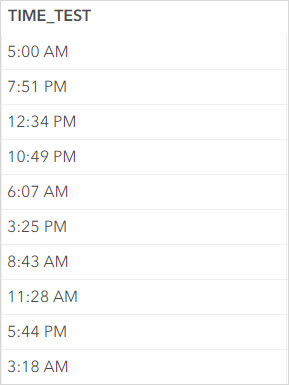
The image below shows the time in the 12-hour time format in the attribute table in Portal for ArcGIS.
Article ID: 000031184
- ArcGIS Online
- Portal for ArcGIS
- ArcGIS Enterprise 11 0
- ArcGIS Enterprise 11 1
Get support with AI
Resolve your issue quickly with the Esri Support AI Chatbot.


Related Information
Discover more on this topic

Search for related information

Find training related to this topic

Explore ideas and give feedback
Get help from ArcGIS experts
Start chatting now