
HOW TO
Connect Excel files using OLE DB connections in ArcGIS Pro
Summary
Object Linking and Embedding Database (OLE DB) is a Component Object Model (COM)-based data access technology that enables connections to external data sources. In ArcGIS Pro, OLE DB connections can be used to access Microsoft Excel and comma-delimited (CSV) files without converting them to geodatabase tables. This approach is useful when the source data is frequently updated, stored in a shared network location, or maintained outside ArcGIS Pro, as changes to the source file are reflected when the connection is refreshed, reducing the need for repeated data imports. This article provides the workflow to connect Excel files using OLE DB connections in ArcGIS Pro.
Cause
ArcGIS Pro does not natively read Excel files as databases through OLE DB unless the Microsoft Access Database Engine is installed. Without this provider, the connection attempt will fail. Additionally, incorrect OLE DB connection settings can prevent the data from loading properly.
Procedure
Prerequisites for a successful OLE DB connection of the Excel files:
• Ensure the Excel worksheets (.xlsx and .xls) or comma-delimited (.csv) files are created and stored in a folder on the local drive.
• Download and install Microsoft Access Database Engine 2016 Redistributable (64-bit) as an OLE DB provider to ensure the Microsoft Excel worksheets (.xls and .xlsx) or comma-delimited files (.csv) are successfully connected through OLE DB. Refer to ArcGIS Pro: Install the drivers to work with Microsoft Excel files for more information.
- Open the ArcGIS Pro project.
- On the View tab, in the Windows group, click Catalog Pane.
- In the Catalog pane, right-click Databases and select New OLE DB Connection.
- Configure the connection parameters in the Data Link Properties dialog box.
- On the Provider tab, select the OLE DB provider for the type of data to be used. In this example, Microsoft Office 12.0 Access Database Engine OLE DB Provider is selected.
- On the Connection tab, for Data Source, copy and paste the full path of the file to be connected from the local folder. In this example, the file is an Excel worksheet (.xlsx).
- On the All tab, select Extended Properties and click Edit Value.
- In the Edit Property Value dialog box, for Property Value, enter the following value depending on the file type and click OK.
- For Microsoft Excel worksheets (.xlsx):
Excel 12.0 Xml;HDR=YES;IMEX=1
- For Microsoft Excel worksheets (.xls):
Excel 8.0;HDR=YES;IMEX=1
- For comma-delimited files (.csv):
Text;HDR=YES;FMT=Delimited
- For Microsoft Excel worksheets (.xlsx):
Note:
The Extended Properties function in the Data Link Properties of the OLE DB connection enables the OLE DB provider to interpret the file format and data correctly. The values can be different depending on the Excel file format used. Refer to Microsoft Support: File formats that are supported in Excel for more information.
- On the Connection tab, click Test Connection.
Note:
• Check all connection parameters before clicking Test Connection.
• Once connected, tabular data from the OLE DB connection in ArcGIS Pro is a read-only file. As a result, the Excel file cannot be directly edited and must be edited outside of ArcGIS Pro. After editing, the connection inside ArcGIS Pro must be refreshed. Refer to ArcGIS Pro: Refresh a Microsoft Excel table for more information.
The pop-up below demonstrates the returned message if the connection is successful.

- Click OK.
Note:
The previous OLE DB connection in the Database node will be replaced when the user creates a new OLE DB connection because ArcGIS Pro can only display one OLE DB connection at a time. To preserve multiple OLE DB connections, save them as connection files (.odc) and store them in a folder added to an ArcGIS project. Multiple Microsoft Excel worksheets (.xlsx and .xls) or comma-delimited (.csv) files cannot be added in a single OLE DB connection because OLE DB treats each of these files as a separate database. Therefore, only one file can be connected at a time.
- Expand OLE DB Connection.odc, right-click the Excel sheet and click Add To Current Map.
- In the Contents pane, expand Standalone Tables, right-click the tabular data and click Open.
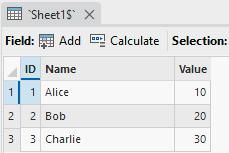
The Microsoft Excel worksheet (.xlsx) below shows the table displayed in the table view.
Article ID: 000038057
- ArcGIS Pro
Get support with AI
Resolve your issue quickly with the Esri Support AI Chatbot.


Related Information
Discover more on this topic

Search for related information

Find training related to this topic

Explore ideas and give feedback
Get help from ArcGIS experts
Start chatting now