
PROBLEM
Graphics card conflict may cause ArcMap to crash
Description
ArcMap can crash due to a variety of reasons. It may crash when loading data view, crash when opening, crash when doing heavy processing, etc. One of the things to consider when ArcMap is crashing is that external issues may influence our software and be causing these crashes. ArcMap relies heavily on the capabilities of graphic cards. The graphics cards can be found on a Windows 7 machine by the following steps:
- Go to Start > Control Panel.
- Click Device Manager.
Note:
Administrative privileges may be necessary to view Device Manager. Some customers may have enough permissions to view, but not make edits.
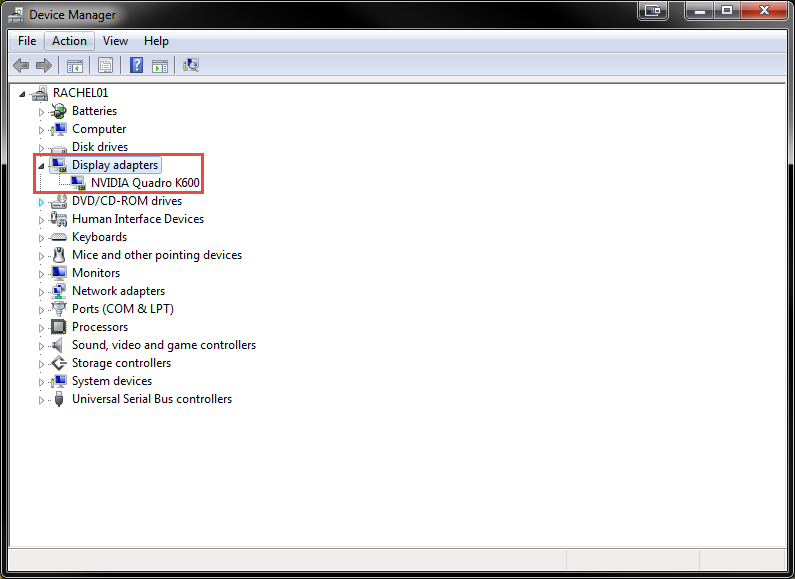
- Expand the Display adapters node. If more than one item is listed, ArcMap crashes might be caused by a conflict between the graphics cards listed.
Cause
Sometimes a conflict in graphics cards can cause ArcMap to crash. This is most often seen when a computer has a dedicated graphics card in addition to an integrated graphics card (e.g. Intel with AMD FirePro). This can be confirmed by disabling one card and leaving the other on, rebooting the computer, and opening ArcMap again to see if the issue is resolved. Users should also try re-enabling the first card and disabling the second as well, and rebooting and re-opening ArcMap. If the behavior is resolved by disabling one card or the other, this could indicate the graphics cards are to blame.
Solution or Workaround
While troubleshooting video cards is beyond Esri Support Service's scope of support, the following three solutions have been known to resolve these problems. Note that Esri recommends an IT department be involved in these steps to approve changes to the computer:
- A series of disable/re-enable/reboot steps may refresh the computer enough that ArcMap can determine which card to use when launching and displaying data:
- Disable first card.
- Restart the computer.
- Open ArcMap.
- Enable first card.
- Disable the second card.
- Restart the computer.
- Open ArcMap.
- Enable the second card again.
- Restart the computer.
- Open ArcMap.
- The customer should also ensure that they have the latest version of the graphics card driver from their hardware company.
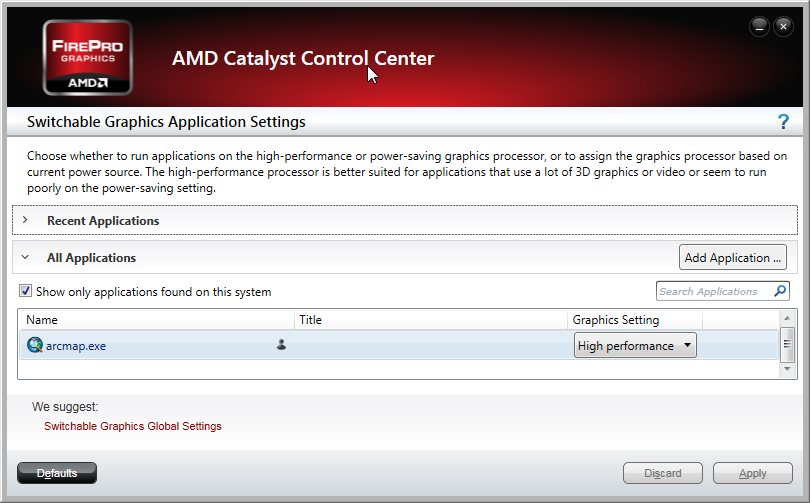
- In the case of issues with AMD FirePro , customers may be able to configure the AMD Catalyst Control Center to run arcmap.exe in High Performance mode.
Article ID: 000013717
- ArcMap
Get support with AI
Resolve your issue quickly with the Esri Support AI Chatbot.


Discover more on this topic

Search for related information

Find training related to this topic

Explore ideas and give feedback
Get help from ArcGIS experts
Start chatting now