
PROBLEM
Fix corrupted Indoor Positioning Data Service
Description
A bug in the Share Indoor Positioning Data Service tool occasionally produces a corrupted Indoor Positioning Data Service, where the Transmitter_Info table contained more records than the Transmitter_Model_Trilinear table. This mismatch (not 1:1) prevents the IPS Engine from starting and returns the error “Inconsistent positioning data.”
Solution or Workaround
If you encounter this issue, please follow these steps:
- Install the latest ArcGIS Pro version (either 3.5.3 or later).
- Delete the problematic Indoor Positioning Data Service from the portal.
- Re-run the Share Indoor Positioning Data Service tool again.
In case you are using a version of Pro earlier than 3.5.3, follow the instructions below:
- Sign in to your ArcGIS Online or Enterprise organization.
- Locate the Indoor Positioning Data Service you want to correct.
- Copy the service URL from the Details section on the right-hand ribbon.
- Open a new project in ArcGIS Pro.
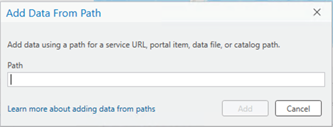
- In the Map tab, go to the Layer group and select Add Data From Path.
- Paste the copied URL into the dialog box and click Add.
- Join the tables (Transmitter_Info and Radio_Transmitter_Model_Trilinear):
- Right-click on Transmitter_Info.
- Select Joins and Relates > Add Join.
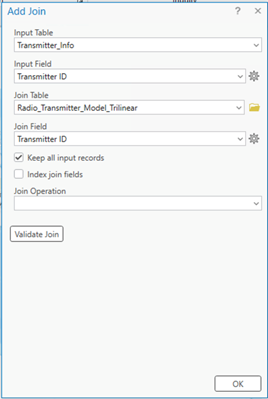
- Configure the join as shown in the screenshot below, then click OK.
- Identify records in the Transmitter_Info table with missing Transmitter IDs:
- Open Select By Attributes.
- Build a query with the WHERE clause: Transmitter ID is NULL.
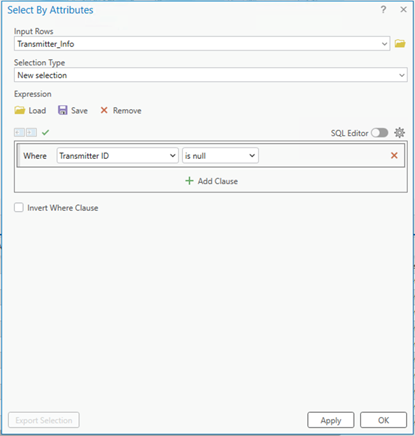
- Remove invalid records:
- After the selection is applied, delete the selected rows and Remove all Joins.
- Save your edits.
Article ID: 000038041
- ArcGIS Pro
Get support with AI
Resolve your issue quickly with the Esri Support AI Chatbot.


Discover more on this topic

Search for related information

Find training related to this topic

Explore ideas and give feedback
Get help from ArcGIS experts
Start chatting now