
PROBLEM
Feature-specific search area not honored when returning points in Business Analyst Pro
Description
When searching for points of interest in ArcGIS Business Analyst Pro, you can set your search extent to a feature layer. When the feature layer contains more than ten polygon features, the search yields a warning message (080384) and returns all points in the map extent, not honoring the feature-specific search area. This occurs when using the Generate Points from Business Listings and Generate Grids and Hexagons geoprocessing tools, as well as the points of interest search workflow.
Cause
The search extent has been defined as greater than ten polygons on the map.
Solution or Workaround
Option 1: Reduce the number of features
Reduce the number of features using the Select tool. Select ten or fewer features from the Input Search or Area of Interest parameter value.
Option 2: Combine features
Use the Dissolve tool to create a single polygon.
Option 3: Run a Python script
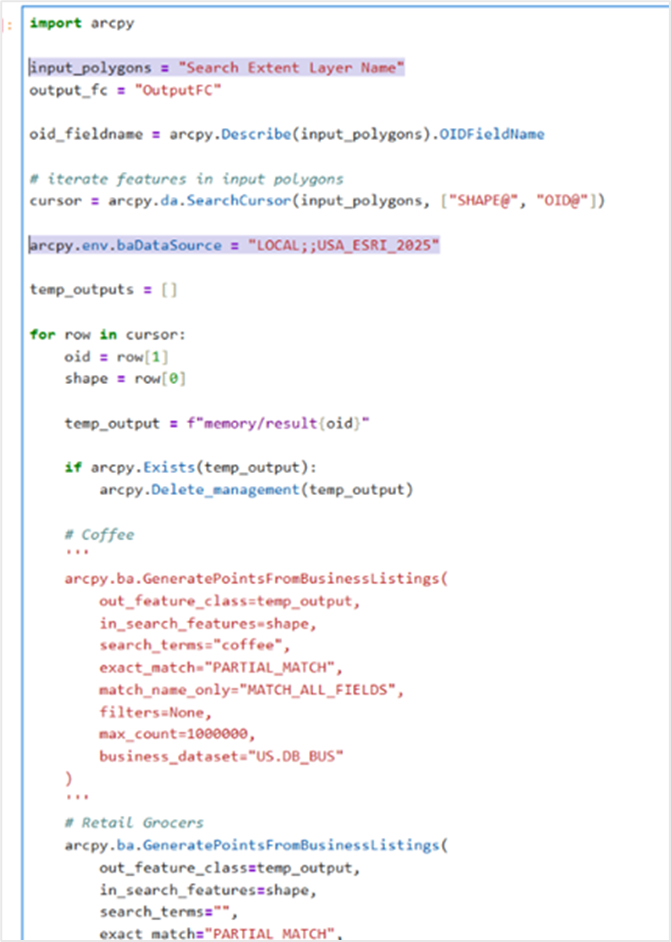
The following sample Python script takes the multi-feature area input, the unique ID field for each feature, and all the parameters from the Generate Points from Business Listings geoprocessing tool. The end result is a single feature class that combines the results from each of the input features, and tags them with the ID of each input feature.
- Copy the following sample Python script.
- Alter the parameters to fit your use case, such as changing the name of the feature layer, dataset, or search terms, as shown in the image below.
- Paste script into a new notebook in ArcGIS Pro.
- Run the script.
import arcpy
arcpy.env.addOutputsToMap = False
input_polygons = "Candidate_Sites_Buffer" output_fc = "OutputFC"
oid_fieldname = arcpy.Describe(input_polygons).OIDFieldName
#iterate features in input polygons
cursor = arcpy.da.SearchCursor(input_polygons, ["SHAPE@", "OID@"])
arcpy.env.baDataSource = "LOCAL;;USA_ESRI_2025"
temp_outputs = []
for row in cursor: oid = row[1] shape = row[0]
temp_output = f"memory/result{oid}"

if arcpy.Exists(temp_output):
    arcpy.Delete_management(temp_output)

# Coffee
'''
arcpy.ba.GeneratePointsFromBusinessListings(
    out_feature_class=temp_output,
    in_search_features=shape,
    search_terms="coffee",
    exact_match="PARTIAL_MATCH",
    match_name_only="MATCH_ALL_FIELDS",
    filters=None,
    max_count=1000000,
    business_dataset="US.DB_BUS"

) ''' # Retail Grocers arcpy.ba.GeneratePointsFromBusinessListings( out_feature_class=temp_output, in_search_features=shape, search_terms="", exact_match="PARTIAL_MATCH", match_name_only="MATCH_ALL_FIELDS", filters="NAICS 44511003 true", max_count=1000000, business_dataset="US.DB_BUS" )
# append SOURCE_OID field
arcpy.management.CalculateField(
    in_table=temp_output,
    field="SOURCE_OID",
    expression=f"{oid}",
    expression_type="PYTHON3",
    code_block="",
    field_type="LONG",
    enforce_domains="NO_ENFORCE_DOMAINS"
)

temp_outputs.append(temp_output)

arcpy.env.addOutputsToMap = True
#merge all results together
arcpy.management.Merge( inputs=temp_outputs, output=output_fc, field_mappings=None, add_source="NO_SOURCE_INFO" )
arcpy.management.JoinField( in_data=output_fc, in_field="SOURCE_OID", join_table=input_polygons, join_field=oid_fieldname, fields=None, fm_option="USE_FM", field_mapping='' )
for temp_output in temp_outputs: if arcpy.Exists(temp_output): arcpy.Delete_management(temp_output)
Article ID: 000039045
- ArcGIS Business Analyst Pro
Get support with AI
Resolve your issue quickly with the Esri Support AI Chatbot.


Discover more on this topic

Search for related information

Find training related to this topic

Explore ideas and give feedback
Get help from ArcGIS experts
Start chatting now