
Frequently asked question
Why does a search query in ArcGIS API for Python content.search() function return different results for None and empty string?
ArcGIS API for Python allows for accessing and creating content, and among the functionality is the content.search() function that contains queries to help with indexing searches. Among the query parameters available, the two commonly used for identifying empty items are the empty string and None. The following is a sample script that may be used to run the script.
user1 = gis.users.search(query=None)[0]
print(f"User ID:",{user1.id},"\n")
print(user1.keys())
print(f"\nNumber of properties:", len(user1.keys()))
The sample script above returns 38 results when the value None is used and returns 40 results when an empty string is used, as shown in the sample images below.
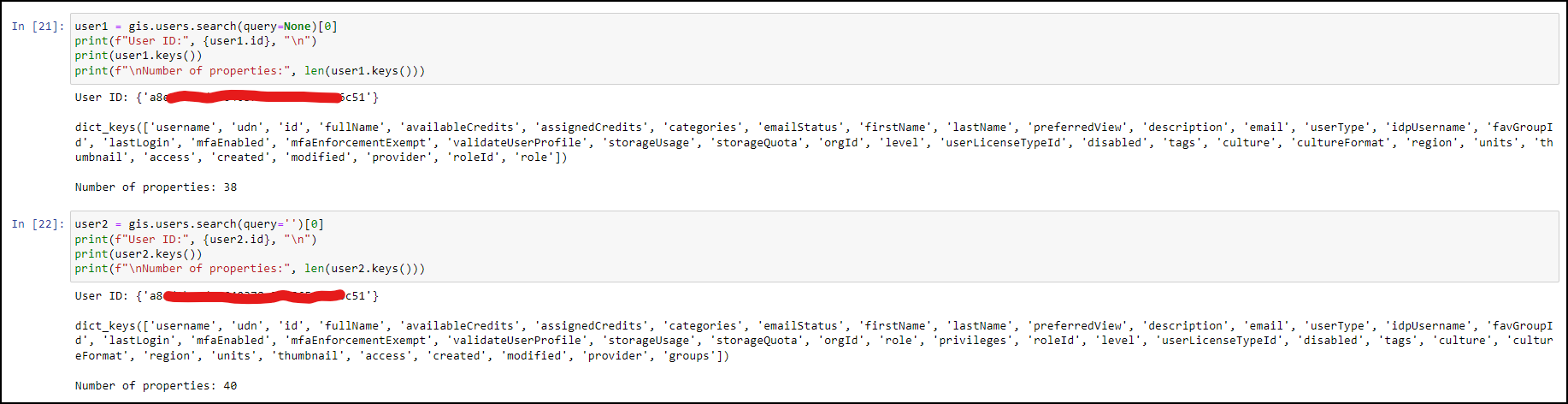
In some cases, it is possible to have the same number of properties returned. However, this behavior is expected because None and empty string are not the same. The None value is a special constant, also known as the NoneType that represents an absence of a value, while it is considered a value. Empty string is also considered a valid value, however, when used in a query, it may be interpreted as a broad or non-restrictive filter. As a result, the search function may return more results compared to when a specific filter is applied. This is similar to the concept of the number zero (0) and nothing. While zero indicates an absence of a number, it is still a number, but nothing is a concept that represents the absence of any value.
Article ID: 000033080
- ArcGIS Online
- Portal for ArcGIS
- ArcGIS API for Python
- ArcGIS Enterprise
Get support with AI
Resolve your issue quickly with the Esri Support AI Chatbot.


Related Information
Discover more on this topic

Search for related information

Find training related to this topic

Explore ideas and give feedback
Get help from ArcGIS experts
Start chatting now