
Frequently asked question
Can vector tile layers be enhanced in ArcGIS Pro?
Answer
No, it is not possible to enhance vector tile layers directly in ArcGIS Pro. Vector tile layers store data in a vector format rather than a raster format, which optimizes rendering performance and display quality. Therefore, ArcGIS Pro does not provide a direct option to enhance them. However, the visual appearance of vector tile layers can be improved by exporting them to a raster format and enhancing the raster layers. Follow the steps below to export the vector tile layer's display to a raster format and enhance the resulting image.
Note:
Exporting a vector tile layer to a raster format converts its display into an image. Enhancing the raster layer only improves the visual quality of the image and does not modify the original vector tile data or its properties.
- Open the ArcGIS Pro project containing the vector tile layer.
- Export the vector tile layer to a raster format.
- In the Contents pane, select the vector tile layer.
- On the Share tab, in the Output group, click the Export Map drop-down arrow and select GeoTIFF-Map.
- In the Export Map pane, for File Type, select TIFF.
- For Name, specify a name and location.
- Click Export.
- Add the exported TIFF layer to the map. Refer to ArcGIS Pro: Browse to data to add to a map or scene for instructions.
- Enhance the TIFF layer.
- In the Contents pane, select the TIFF layer.
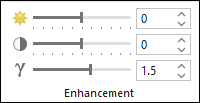
- On the Raster Layer tab, configure the Enhancement options as desired. Refer to ArcGIS Pro: Enhancement for instructions and more information.
The image below shows the available Enhancement options that can be configured.
Article ID: 000037245
- ArcGIS Pro
Get support with AI
Resolve your issue quickly with the Esri Support AI Chatbot.


Related Information
Discover more on this topic

Search for related information

Find training related to this topic

Explore ideas and give feedback
Get help from ArcGIS experts
Start chatting now