
ERROR
You do not have permissions to access this resource or perform this operation
Error Message
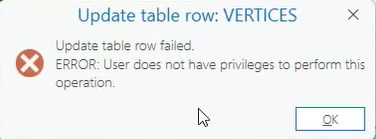
Attempts to view, validate or edit a data store item and its related layers either from ArcGIS Pro or Portal for ArcGIS fails with the following error messages:
ERROR: User does not have privileges to perform this operation
You do not have permissions to access this resource or perform this operation
Cause
In ArcGIS Enterprise 11.2 and later releases, a new user type extension is introduced: ArcGIS Advanced Editing. This new user type replaces the existing Utility Network, Trace Network and Parcel Fabric user type extensions. It provides access to advanced editing and geodatabase capabilities in web and native device apps. This error can occur after upgrading from a previous release of ArcGIS Enterprise, where the user type extension did not exist.
Solution or Workaround
Assigning the new user type extension to the desired user in ArcGIS Enterprise can solve the editing errors. This user type extension is included in the Professional and Professional Plus user types. It can also be included as an add-on for user types with at least the capability to view and edit data, such as the Mobile Worker, Contributor, and Creator user types.
Follow the steps below to assign this user type extension to a member in Portal for ArcGIS:
- Navigate to the Portal for ArcGIS home page.
https://<machine>.<domain>.com/webadaptor/home
- You may receive a message indicating “The number of licenses assigned exceeds the number of licenses available”. This is expected and reflects the introduction to the new user type replacing the previous ones.
- Navigate to Organization > Members. Search the member and click on the three dots in front of the member name. Select Manage Add-on licenses.
- Under User type Extension, confirm if ArcGIS Advance Editing is included.
- If not, check the box in front of the ArcGIS Advance Editing and click Save.
Now the user should be able to edit the Enterprise Geodatabase referenced data, including branch versioning data. Refer to Introduction to licensing user type extensions to know more about this new user type extension.
Article ID: 000034680
- Portal for ArcGIS
Get support with AI
Resolve your issue quickly with the Esri Support AI Chatbot.


Related Information
Discover more on this topic

Search for related information

Find training related to this topic

Explore ideas and give feedback
Get help from ArcGIS experts
Start chatting now