
ERROR
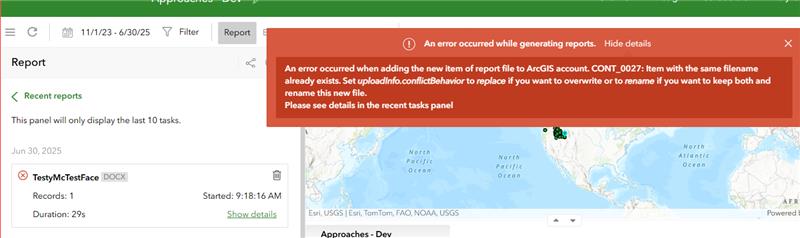
Item with the same filename already exists. Set uploadInfo.conflictBehavior to replace if you want to overwrite or to rename if you want to keep both and rename this new file" in ArcGIS Survey123 reports
Error Message
While generating reports in ArcGIS Survey123. the following error message is returned:
CONT_0027: Item with the same filename already exists. Set uploadInfo.conflictBehavior to replace if you want to overwrite or to rename if you want to keep both and rename this new file.
Cause
This occurs when ArcGIS Enterprise is unable to access the Amazon Web Service (AWS) S3 bucket URL to temporarily save the reports, before adding them as new items in Portal for ArcGIS.
Solution or Workaround
Whitelist the following URLs:
• https://arcgis-prd-survey123-use1-reports.s3.us-east-1.amazonaws.com/
• https://featurereport-prod.s3.amazonaws.com/
• https://myaws-prod.s3.amazonaws.com/
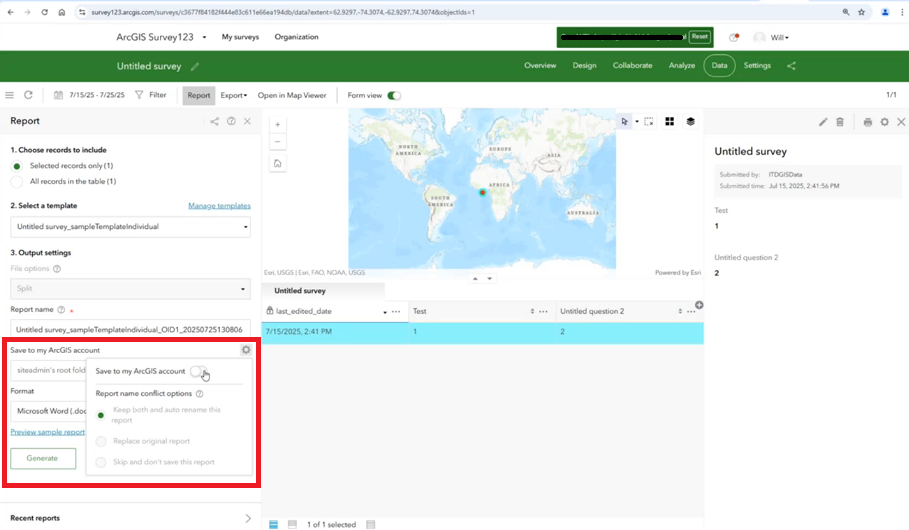
Additionally, disable the option to Save to my ArcGIS account within the ArcGIS Survey123 report settings as shown in the next image. With that option disabled, the reports are generated successfully.
Article ID: 000037356
- ArcGIS Survey123 Website
Get support with AI
Resolve your issue quickly with the Esri Support AI Chatbot.


Related Information
Discover more on this topic

Search for related information

Find training related to this topic

Explore ideas and give feedback
Get help from ArcGIS experts
Start chatting now