
ERROR
ArcGIS Monitor database is not ready
Error Message
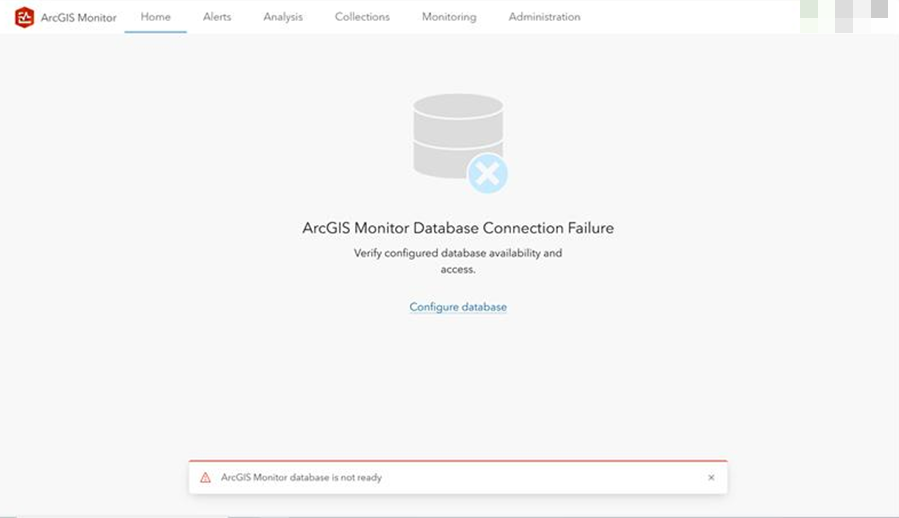
After installing ArcGIS Monitor Server, configuring PostgreSQL for the Monitor database, and adding the Monitor database connection in the ArcGIS Monitor Server interface, the ArcGIS Monitor Home page displays the following messages:
Error:
ArcGIS Monitor Database Connection Failure
Verify configured database availability and access.
Error:
ArcGIS Monitor database is not ready
Cause
The PostgreSQL service is in an invalid state, causing it to become unresponsive to any connection attempts. As a result, ArcGIS Monitor cannot establish a database connection even though the configuration is correct.
Solution or Workaround
Restart the PostgreSQL service to ensure all required startup procedures are initialized correctly and allow ArcGIS Monitor to establish a valid connection.
- Press Windows key + R to open the Run dialog box.
- Type services.msc and click OK.
- In the Services window, locate the PostgreSQL service used by ArcGIS Monitor.
- Right-click the service and click Stop.
- After the service stops, right-click it again and click Start.
Article ID: 000039076
- ArcGIS Monitor Administrator
- ArcGIS Monitor Server
- ArcGIS Enterprise
Get support with AI
Resolve your issue quickly with the Esri Support AI Chatbot.


Related Information
Discover more on this topic

Search for related information

Find training related to this topic

Explore ideas and give feedback
Get help from ArcGIS experts
Start chatting now