
ERROR
ArcGIS Experience Builder: The file <file name> cannot be successfully uploaded
Error Message
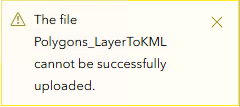
When uploading a KML file with the Add Data widget in ArcGIS Experience Builder, the upload fails and returns the following error message:
Error:
The file <file name> cannot be successfully uploaded.
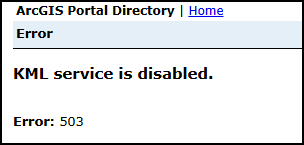
The KML endpoint in the ArcGIS Portal Directory returns the following error message:
Error:
KML service is disabled.
Error: 503
Cause
The KML service is disabled in Portal for ArcGIS. Since ArcGIS Enterprise 10.9, the enableKmlService property is available in the Portal for ArcGIS system settings. By default, this property is set to true. When the property is set to false through the ArcGIS Portal Administrator Directory, the KML service is disabled, causing KML uploads to fail.
Solution or Workaround
To enable the KML service, apply the steps below.
- Log in to the ArcGIS Portal Administrator Directory as an administrator.
- On the Site Root - / page, for Resources, click System.
- On the System page, for Resources, click Properties.
- On the System Properties page, for Resources, click Update Properties.
- On the Update System Properties page, in the Properties (in JSON format) text box, type the following property:
{"enableKmlService":true}
Note:
Applying the following step restarts the portal.
- Click Update Properties.
Article ID: 000037143
- Portal for ArcGIS
- ArcGIS Enterprise
- ArcGIS Experience Builder
Get support with AI
Resolve your issue quickly with the Esri Support AI Chatbot.


Related Information
Discover more on this topic

Search for related information

Find training related to this topic

Explore ideas and give feedback
Get help from ArcGIS experts
Start chatting now