
ERROR
ERROR 001248 This Geodatabase is not supported. Please upgrade your Geodatabase when using the Prune Branch History tool
Error Message
The Prune Branch History tool, introduced in ArcGIS Pro 3.5, is a new feature designed to help users manage and clean up the historical records of branch versioned datasets. This tool allows you to delete outdated, retired records—freeing up storage and improving data efficiency without compromising essential information.
Error Messages
While using the Prune Branch History geoprocessing tool, you may encounter one of the following error messages indicating that a stored procedure is missing or that an upgrade is necessary.
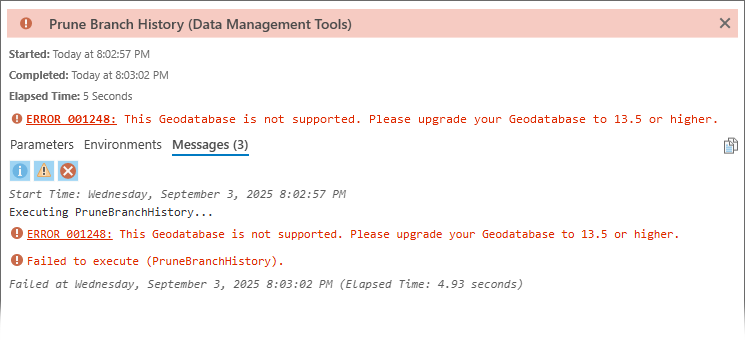
ERROR 001248: This Geodatabase is not supported. Please upgrade your Geodatabase to 13.5 or higher.
Failed to execute (PruneBranchHistory).
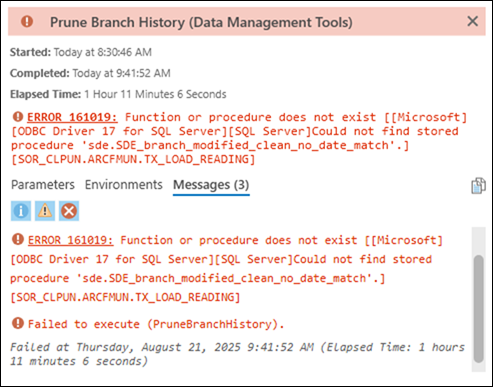
ERROR 161019: Function or procedure does not exist [[Microsoft]
[ODBC Driver 17 for SQL Server][SQL Server]Could not find stored
procedure 'sde.SDE_branch_modified_clean_no_date_match'.]
[SOR_CLPUN.ARCFMUN.TX_LOAD_READING]
Failed to execute (PruneBranchHistory).
Cause
Version Dependency
The Prune Branch History tool has a dependency that requires the stored procedure sde_branch_modified_clean_no_date_match. This stored procedure was introduced to all database platforms in version 3.4 and backported to earlier versions via patches, however, compatibility varies by platform.
Compatible Versions
The following versions of the Enterprise geodatabase are supported with the Prune Branch History geoprocessing tool. The specific versions listed represent the minimum version supported for each major release of ArcGIS Pro and ArcGIS Enterprise; newer minor versions are also supported. All newer major versions higher than 3.4 are also supported unless otherwise specified.
Oracle
- 3.5 or newer
SQL Server, PostgreSQL, Db2
- 3.4 or newer
- 3.3.2
- 3.2.4
- 3.1.7
- 11.3 Patch 1
- 11.1 Patch 3
- 10.9.1 Patch 7
- 10.8.1 Patch 12
SAP HANA
- 3.4 or newer
- 3.3.3
- 3.2.4
- 3.1.8
- 11.3 Patch 1
- 11.1 Patch 3
- 10.9.1 Patch 7
- 10.8.1 Patch 12
Solution or Workaround
Upgrade your geodatabase
If you receive error messages similar to those shown in the images above while using the Prune Branch History tool, it is recommended to upgrade your geodatabase to one of the compatible versions listed above or higher, for your specific DBMS platform.
Learn more about ArcGIS Pro releases and patches.
For more information about geodatabase upgrades, see the following upgrade topics for the type of geodatabase you are using:
|
Geodatabases in Db2 | Upgrade a geodatabase in Db2 |
|
Geodatabases in Oracle | Upgrade a geodatabase in Oracle |
|
Geodatabases in PostgreSQL | Upgrade a geodatabase in PostgreSQL |
|
Geodatabases in SAP HANA | Upgrade a geodatabase in SAP HANA |
|
Geodatabases in SQL Server | Upgrade a geodatabase in SQL Server |
Article ID: 000038223
- ArcGIS Pro
- ArcGIS Enterprise
- ArcGIS Utility Network
Get support with AI
Resolve your issue quickly with the Esri Support AI Chatbot.


Related Information
Discover more on this topic

Search for related information

Find training related to this topic

Explore ideas and give feedback
Get help from ArcGIS experts
Start chatting now