
HOW TO
Ensure that the number of decimal places for a label match the number of decimal places for the same feature in the attribute table
Summary
When applying numeric labels to features in ArcGIS Pro, it may be necessary to set the number of decimal places for the labels to be the same as their respective features in the attribute table.
Procedure
If the expression for a label class is set to use the VBScript, JScript, or Python language, the number of decimal places for those labels will automatically match the number of decimal places in the attribute table. However, if the expression for a label class is set to the Arcade language, the number of decimal places does not automatically match.
This workflow describes how to turn on labels for a feature layer, ensure the labels are using values from a numeric field, and choose the language that a label expression is set to when applying numeric labels in ArcGIS Pro:
- In the Contents pane, right-click the feature layer to label, and click Label
 to turn on labeling for that feature layer.
 - Ensure that the feature layer is selected in the Contents pane, and go to the Labeling tab. In the Label Class group, ensure that the Field dropdown is set to a numeric field.
- Next to the Field dropdown in the Labeling tab's Label Class group, click Expression
 .
. - In the Label Class - <layer_name> pane, select a language for the label class' label expression through the Language dropdown.
After following the steps above, the number of decimal places for the labels automatically matches the features in the attribute table as long as Arcade is not selected through the Language dropdown. If Arcade is selected through the Language dropdown, the number of decimal places must be set manually to match the number of decimal places in the attribute table through the label expression, as follows:
Round numbers in the feature layer label
- On the Contents pane, select the feature layer.
- On the top ribbon, under Feature Layer, click the Labeling tab, and click Enable Labeling
 .
. - In the Label Class group, click Expression
 in the Field section. The Label Class - <layer_name> pane opens.

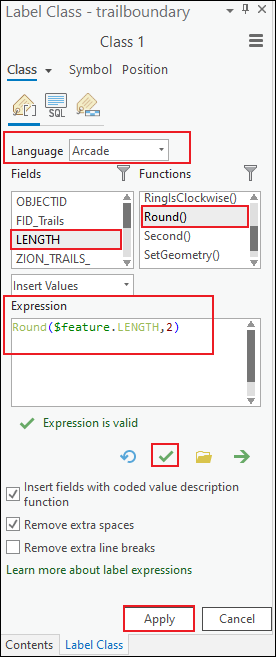
- In Label Class - <layer_name> pane, ensure Arcade is selected for Language.
- In the Expression text box, delete the existing value.
- Under Functions, double-click Round().
- Under Fields, double-click the numeric field. In this example, the field is LENGTH. Ensure the field value is inserted in the Round() function.
- In the Expression box, next to the field value in the Round() function, type a comma (,) and the number of decimal places. In this example, the number of decimal places is 2.
Round($feature.<field_name>,<decimal_places_number>)
- Click Verify
 to validate the expression.
 - Click Apply.
Article ID: 000035634
- ArcGIS Pro
Get support with AI
Resolve your issue quickly with the Esri Support AI Chatbot.


Discover more on this topic

Search for related information

Find training related to this topic

Explore ideas and give feedback
Get help from ArcGIS experts
Start chatting now