
Frequently asked question
What is the difference between My Esri, ArcGIS Online, and Portal for ArcGIS?
Answer
| My Esri | ArcGIS Online |
| My Esri | ArcGIS Online |
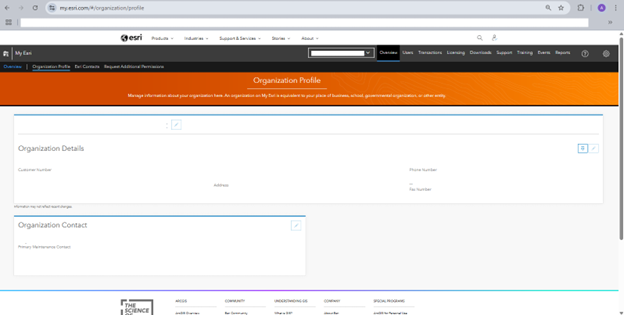
| A web portal designed to help with Esri software's license and administrative functionalities. | A cloud-based platform for creating, sharing, and managing maps, apps, and data. |
| License Management: My Esri allows you to access, allocate, and manage the software licenses for your organization. It can also produce license files and provide usage reports. | Mapping and Visualization: Users can easily create and edit maps using ArcGIS Online, which includes tools for visualizing data in different formats. |
| Software Downloads: Get the most recent software releases and updates for licensed products. | Content Sharing and Collaboration: Share data, applications, and maps with the general public, stakeholders, and coworkers. Additionally, it promotes cooperative work methods, enabling several users to collaborate on projects. Your ArcGIS account serves as your organizational identity, granting you access to ArcGIS Online and offering specific privileges and functionalities according to your User Type and role within the organization. |
| Training and Certification: Gain access to a variety of training tools, such as webinars, courses, and certification options, that can help you improve your GIS knowledge. It is a platform to create technical support cases. | App Building: Create interactive web applications without the need for advanced coding skills. ArcGIS Online includes templates and configurable apps for various purposes. |
My Esri:
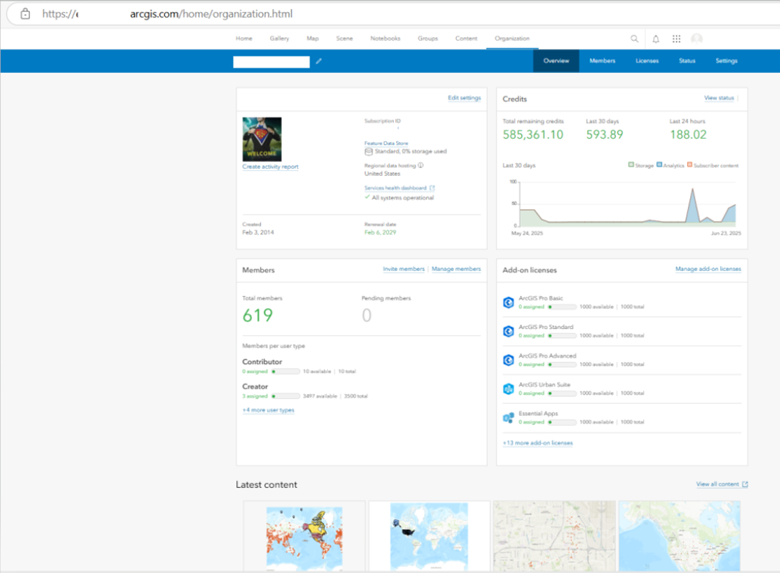
ArcGIS Online:
| ArcGIS Online (ArcGIS Online) | Portal for ArcGIS (ArcGIS Enterprise) |
| ArcGIS Online is a SaaS, or software-as-a-service, where Esri hosts and manages organizations’ infrastructures, and users can access ArcGIS Online wherever there is an internet connection. | ArcGIS Enterprise is software that is installed on infrastructure that the organization manages. |
| Organizations that purchase ArcGIS Online must decide how many users they require and whether they want a standard feature data store or a premium feature data store (which offers more processing capacity and storage capacity). There is no need to construct or install a system. | The deployment of ArcGIS Enterprise can be done on-premises or in a cloud environments, whether they are public or private. Additionally, it may be installed on Kubernetes, Linux, or Windows. Based on the need, businesses may increase their ArcGIS Enterprise installations. |
| Users have the ability to create maps and applications that leverage the performance and scalability features integrated into the universally accessible ArcGIS Online platform. | Organizations needing high availability can design their ArcGIS Enterprise setups to meet strict uptime standards. |
| Data Storage: When utilizing ArcGIS Online, users generally save and access data within the SaaS platform. By default, ArcGIS Online offers 500 gigabytes of feature data storage, with additional premium options for 1 terabyte or 4 terabytes of storage. Additionally, there is the option to use externally hosted services and layers from ArcGIS Enterprise, as well as Keyhole Markup Language (KML) layers, Open Geospatial Consortium (OGC) web services, and other compatible web services. | Data Storage: Users of ArcGIS Enterprise have the flexibility to select their data storage locations. They can utilize data stored within ArcGIS-managed data stores provided by the system. Additionally, they can reference their own registered data sources, including folders, enterprise geodatabases, and cloud data warehouses, regardless of size. |
| Maintenance: ArcGIS Online receives updates from Esri multiple times a year without the need for any user intervention or planning. Users interested in previewing the updates before they are officially released can join the ArcGIS Online Early Adopter Community program, which provides access to interface updates and new features several weeks in advance. After the updates are launched, all changes become instantly accessible to all ArcGIS Online users. | Maintenance: With ArcGIS Enterprise, your organization has the flexibility to decide the optimal timing for upgrading to a new version. You might prefer to arrange specific downtime or postpone the upgrade until you are ready for major changes or have trained your staff on the new features. Managing the architecture, deployment, and maintenance of ArcGIS Enterprise allows you this degree of control, but it requires thorough planning and time investment. IT administrators in your organization will be essential for designing, deploying, and maintaining the system, along with the necessary physical or virtual infrastructure to support the Enterprise. |
| Licensing: In ArcGIS Online, you determine the quantity and type of user licenses required for your organization. There are no extra initial expenses for establishing an ArcGIS Online organization beyond the user licenses. Since Esri manages your data and the analytical services used by your organization, there are recurring costs based on usage (referred to as credits), which depend on the volume of data you store and the extent of analysis conducted. | Licensing: ArcGIS Enterprise licensing is determined by the number of cores in your servers when installed on Windows and Linux. It can also be set up on Kubernetes, but in this case, it operates under a subscription model, as it is cloud-native and not reliant on server cores. Additionally, licenses must be acquired for users who want to create, edit, or share content within the platform. Since you use your own infrastructure and hardware, there are no costs associated with consumption-based storage or computing in Enterprise. |
Portal for ArcGIS (ArcGIS Enterprise Architecture):
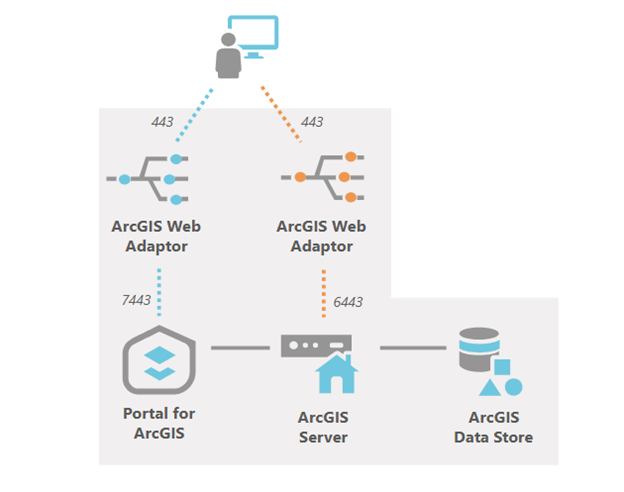
To summarize, ArcGIS Online is a cloud platform designed for the creation, sharing, and online access of maps. In contrast, ArcGIS Enterprise is a software suite that you host yourself, providing enhanced customization and control over data management. ArcGIS Pro serves as a desktop application for sophisticated GIS analysis and data handling, while "My Esri" is your personal account portal for managing licenses, accessing support, and updating account details on the Esri platform. We do recommend enabling Esri Access via ArcGIS Online accounts – if an institution has implemented Enterprise logins, this is an automated process for anyone joining the organization (no additional work for admins or students)
Article ID: 000037025
- ArcGIS Pro
- ArcGIS Online
- Portal for ArcGIS
Get support with AI
Resolve your issue quickly with the Esri Support AI Chatbot.


Discover more on this topic

Search for related information

Find training related to this topic

Explore ideas and give feedback
Get help from ArcGIS experts
Start chatting now