
HOW TO
Check if SQL Server and SQL Azure Connections from ArcGIS clients are encrypted
Summary
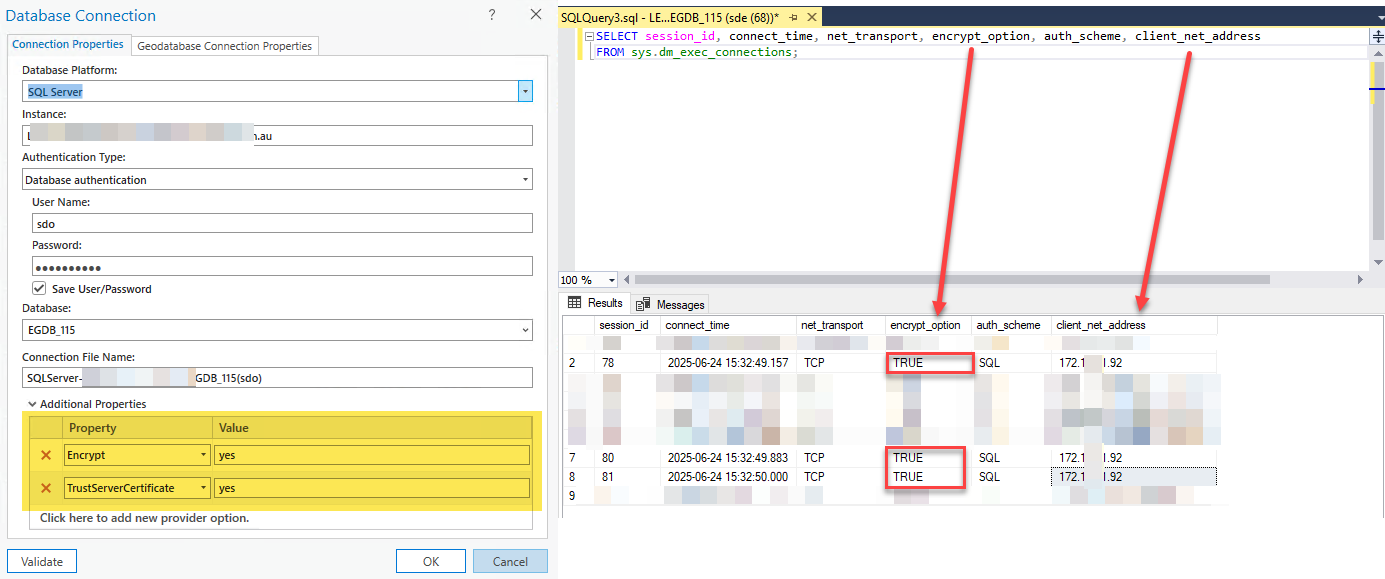
To ensure encrypted communication between ArcGIS Server and/or ArcGIS Pro and Microsoft SQL Server, configure the enterprise geodatabase connection string with the parameters Encrypt=yes;TrustServerCertificate=yes in accordance with the guidelines outlined in the ArcGIS Pro documentation: Encrypted connections to SQL Server databases
Procedure
Using SQL Server Management Studio, execute the following database query to verify that the client session connection is configured with ENCRYPT_OPTION = TRUE.
SELECT session_id, connect_time, net_transport, encrypt_option, auth_scheme, client_net_address
FROM sys.dm_exec_connections;
Article ID: 000036738
- ArcGIS Pro
- ArcGIS Server
Get support with AI
Resolve your issue quickly with the Esri Support AI Chatbot.


Related Information
Discover more on this topic

Search for related information

Find training related to this topic

Explore ideas and give feedback
Get help from ArcGIS experts
Start chatting now