
HOW TO
Calculate the mean elevation of a polygon from a DEM in ArcGIS Pro
Summary
The mean elevation of a polygon refers to the average elevation value within its boundaries. In ArcGIS Pro, utilizing a digital elevation model (DEM) facilitates retrieving the mean elevation value for the area covered by the polygon. A DEM can enable various analyses, including terrain assessment, hydrological modeling, and infrastructure planning.
This article highlights the workflow on how to calculate the mean elevation within a polygon feature from a DEM using the Add Surface Information tool.
Procedure
Note:
The Add Surface Information tool requires a 3D Analyst license.
The Add Surface Information tool adds the attributes of input features with height-based statistical information derived from the overlapping surface.
- Open the ArcGIS Pro project.
- In the Geoprocessing pane, search for and open Add Surface Information (3D Analyst Tools).
- For Input Features, select the polygon feature layer from the drop-down list.
- For Input Surface, select the DEM layer from the drop-down list.
- For Output Property, check the Mean Z check box.
- For Method, select the preferred method to determine the information from the surface layer.
- Click Run.
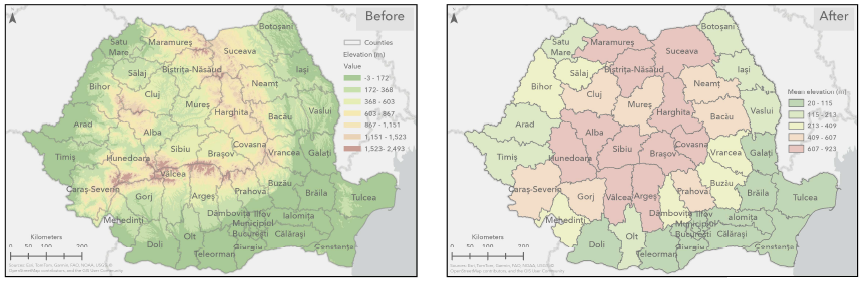
The images below show the polygon features underlain by the digital elevation model (DEM) layer (Before) and the mean elevation information of polygon feature classes derived from the DEM using the Add Surface Information tool (After).
Mean elevation values of the DEM-derived polygon feature classes using the Add Surface Information tool.
Article ID: 000035520
- ArcGIS Pro
Get support with AI
Resolve your issue quickly with the Esri Support AI Chatbot.


Discover more on this topic

Search for related information

Find training related to this topic

Explore ideas and give feedback
Get help from ArcGIS experts
Start chatting now