
Support Resource
Business Analyst Pro U.S. 2025 Local Dataset, Updated files available to download
These updated files for the local U.S. 2025 dataset for Business Analyst Pro include fixes for correcting the calculation of the land area variable, updated infographics, and corrections to the “Room to Roam” Tapestry segment.
- When connected to the U.S. 2025 dataset, incorrect land area calculations were being returned for the LANDAREA variable (included in common calculations, such as population density).
- Updates to infographic and classic report templates.
- Correction to the truncated name and segment ID for Tapestry segment K7 Room to Roam.
The LANDAREA variable was not correctly calculating land area in relation to the underlying block group data.
The segment ID for segment K7 Room to Roam was truncated, incorrectly displaying “K” as the segment ID and “Room to oam” as the segment name. Summarization files, as well as infographic and report files, were updated to correct this error.
Eight summary report files and 26 infographic templates were also updated to match template updates that were made after the U.S. 2025 local data release.
- Download the U.S. 2025 updated files to the machine where the current U.S. 2025 dataset is stored.
- Extract the compressed data patch folder to the location on the C:\ drive where the current U.S. 2025 dataset is stored.
- For example: C:\ArcGIS\Business Analyst\US_2025
- When prompted, click Replace the files in the destination.
- If prompted for administrative permission, click Apply to all files and accept.
- The updated U.S. 2025 data files will overwrite the original U.S. 2025 dataset with the necessary updates.
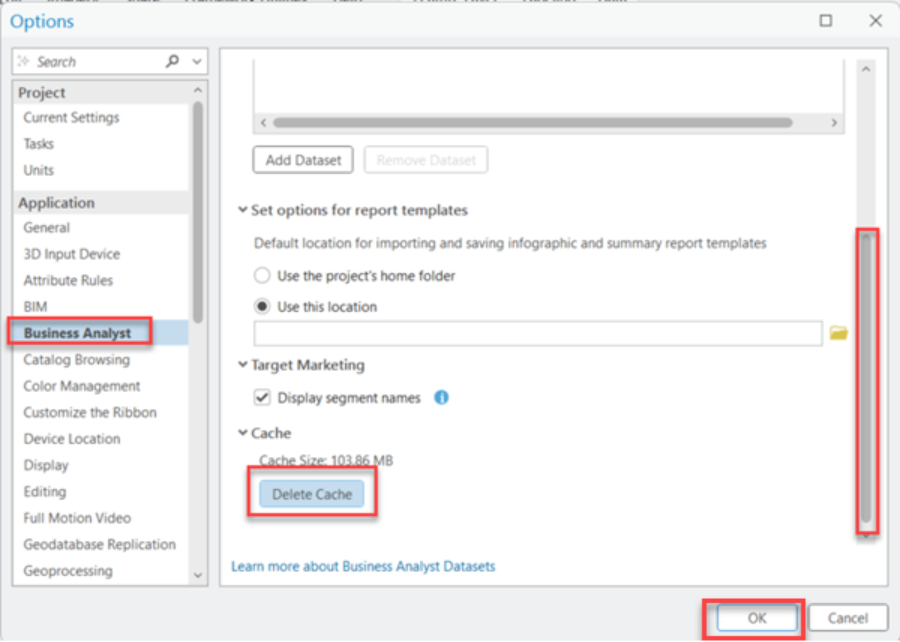
- Once complete, open ArcGIS Pro and, under Options > Business Analyst, clear the cache for Business Analyst to make sure data updates are applied.
Article ID: 000039653
- ArcGIS Business Analyst Pro
Get support with AI
Resolve your issue quickly with the Esri Support AI Chatbot.


Related Information
Discover more on this topic

Search for related information

Find training related to this topic

Explore ideas and give feedback
Get help from ArcGIS experts
Start chatting now