
PROBLEM
Bulk import of OpenID users import as SAML
Description
Bulk adding OpenID users in sites where SAML is also configured requires a manual change to each imported user or they are added as SAML users.
Note:
This issue has been encountered in ArcGIS Enterprise 11.4, but may also affect other versions.
After setting up Portal for ArcGIS 11.4 as part of an ArcGIS Enterprise site with SAML and OpenID users, setup problems are encountered importing batch files of OpenID users.
- Log into Portal Home and navigate to Organization > Members > Add Members.
- Select the option to Add members for organization-specific logins.

- Click Next and Add members from a file.
- Upload a file of members with OpenID accounts.
- Click Edit on one of the new users loaded from file.
- Note that the Identity Type is set to SAML, as shown in the image below.
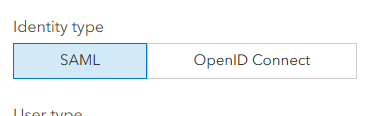
Since there is no option to change all users at once, you must edit each user here, otherwise they are added as SAML accounts and then OpenID connect fails. Once the change is made, users are added as OpenID and able to connect successfully. However this may be burdensome if there are a large number of users.
Cause
When SAML and OpenID users are both active in Enterprise, SAML is the default creation option with no option to bulk add OpenID users without going through the whole list of users and make a change upon import.
Solution or Workaround
To add a large number of OIDC users, temporarily disable the SAML login option from Portal Home > Organization > Settings > Security when importing the users. The users will be imported properly (as OIDC, not SAML). Once imported, re-enable SAML.
Article ID: 000034202
- ArcGIS Enterprise
Get support with AI
Resolve your issue quickly with the Esri Support AI Chatbot.


Discover more on this topic

Search for related information

Find training related to this topic

Explore ideas and give feedback
Get help from ArcGIS experts
Start chatting now