
HOW TO
Authorize ArcGIS Business Analyst Enterprise named user licenses, server roles, extensions and applications
Summary
This article describes the workflows for obtaining the required named user and add-on application licenses and extensions for ArcGIS Business Analyst Enterprise in My Esri. Obtaining and applying the requisite licenses is done after setting up a base ArcGIS Enterprise deployment.
What's included in ArcGIS Business Analyst Enterprise:
- ArcGIS Enterprise Advanced
- ArcGIS Enterprise Advanced staging
- ArcGIS GeoEnrichment Server
- ArcGIS GeoEnrichment Server staging
- 25 Creator user types with 25 add-on licenses (Applications) for ArcGIS Business Analyst Web App Advanced, and 500 Viewers.
- Three Professional user types for access to ArcGIS Pro Standard with three add-on licenses for Business Analyst, Network Analyst, and StreetMap Premium North America extensions for ArcGIS Pro
- Downloadable U.S. data packs for Enterprise and Pro
The table and workflows below illustrate the licensing that is part of the Business Analyst Enterprise software solution bundle and may not fully reflect every organization's available software and licensing.
|
ArcGIS Business Analyst Enterprise Licensing | ||||
|
Portal for ArcGIS | ||||
|
License Name |
Product Type |
License Type |
Qty |
Notes |
|
Creator user type |
Named User license |
Portal license file |
25 |
Included with ArcGIS Enterprise Advanced; allows users to create and manage content, perform analysis and build apps. Provides access to ArcGIS Pro Basic. |
|
Viewer user type |
Named User license |
Portal license file
|
500 |
Included with ArcGIS Enterprise Advanced; allows users to view items that are shared with them by other ArcGIS users. |
|
Business Analyst Web App Advanced |
Add-on licenses (Applications) |
Portal license file |
25 |
Add-on licenses to ArcGIS Business Analyst Web App Advanced and Mobile |
|
Professional user type |
Named User license |
Portal license file |
3 |
Includes everything in the Creator use type, plus a license for ArcGIS Pro Standard |
|
ArcGIS Server |
| |||
|
License Name |
Product Type |
License Type |
Qty |
Notes |
|
ArcGIS GIS Server Advanced |
ArcGIS Server role |
ArcGIS Server license file |
2 |
4 cores for the hosting server of the base ArcGIS Enterprise deployment and 4 cores for ArcGIS GeoEnrichment Server |
|
ArcGIS Business Analyst Enterprise |
ArcGIS Server role |
ArcGIS Server license file |
1 |
Authorizes ArcGIS GeoEnrichment Server |
|
ArcGIS Network Analyst |
ArcGIS Server extension |
ArcGIS Server license file |
2 |
Included with ArcGIS Server Advanced |
|
ArcGIS Business Analyst Server N America |
ArcGIS Server extension |
ArcGIS Server license file |
1 |
Authorizes StreetMap Premium (streets & locator) data for the U.S. on ArcGIS Server |
|
ArcGIS Pro | ||||
|
Business Analyst |
Add-on licenses (ArcGIS Pro extension) |
Portal license file |
3 |
Provides Business Analyst capabilities in ArcGIS Pro |
|
Network Analyst |
Add-on licenses (ArcGIS Pro extension) |
Portal license file |
3 |
Provides Network Analyst capabilities in ArcGIS Pro |
|
ArcGIS StreetMap Premium North America |
Add-on licenses (ArcGIS Pro extension) |
Portal license file |
3 |
Grants use of street network, geocoder, and basemap data for the U.S. in ArcGIS Pro |
|
Local Business Analyst dataset |
Downloadable dataset |
Data license file (.sdlic) |
3 |
Grants use of the local Business Analyst dataset for ArcGIS Pro |
Procedure
Notes:
- The portal license file is a single .json file downloadable from My Esri
- A typical Business Analyst Enterprise deployment has two server sites, the hosting server site and the GeoEnrichment server site.
- ArcGIS Network Analyst for Server is included with the ArcGIS GIS Server Advanced role and should be authorized on both server sites.
- The ArcGIS Business Analyst Server N America extension, which authorizes the StreetMap Premium extension for ArcGIS Server, can be deployed to whichever server site you choose to configure the routing and geocoding services.
The following setup workflows require specific My Esri privileges. If the options are not visible, request the necessary permissions from the organization's My Esri administrator.
Portal for ArcGIS
This workflow has been added to this article only for the reader's convenience to illustrate the user types, add-on licenses, and extensions that are provided with the Business Analyst Enterprise solution bundle and may not fully reflect every organization’s available licensing. The product documentation page provides instructions on how to obtain a portal license file.
This must be performed on a machine that is connected to the internet, as direct access to My Esri is required. This will generate a complete license file for your ArcGIS Enterprise portal deployment, which will include user types, included applications, and any add-on applications as applicable.
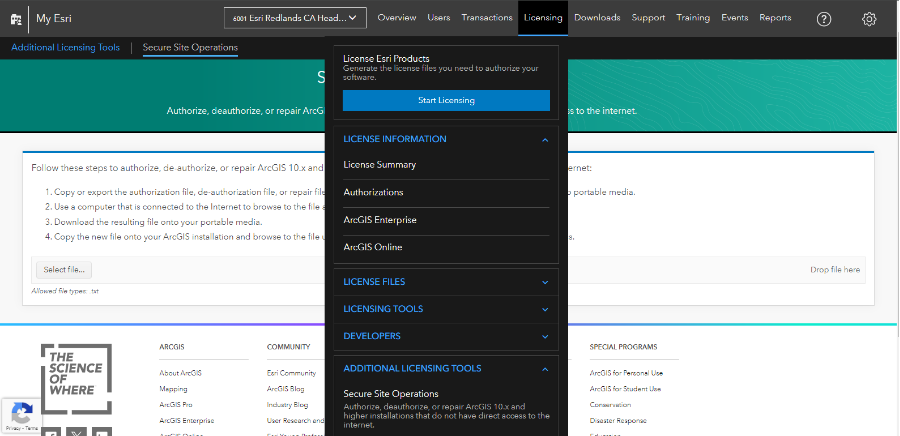
- Log in to My Esri.
- Select Licensing > Start Licensing, as shown in the next image.
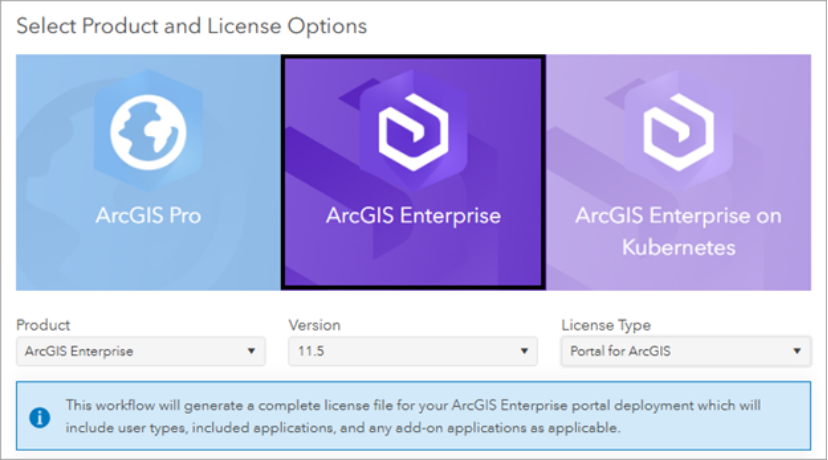
- Under Select Product and License Options, select ArcGIS Enterprise.
- For Product, ArcGIS Enterprise is selected by default.
- For Version, select the appropriate version.
- From the License Type list, select Portal for ArcGIS, as shown in the image below, and click Next.
- Under Select User Type and Application Licenses, you will see the user types, add-on applications, and extensions that are available for your organization. Business Analyst Enterprise includes the following:
- 25 Creator user types.
- 25 add-on licenses for Business Analyst Web App Advanced.
- 3 Professional user types.
- Select the number of licenses for each user type and add-on applications to include in the license file. Click Next.
-
Under Select Add-on ArcGIS Pro License and ArcGIS Pro Extensions, you will see the ArcGIS Pro add-on licenses and extensions available for your organization. Business Analyst Enterprise includes the following:
- 3 ArcGIS Pro Standard licenses
- 3 extension licenses for ArcGIS Business Analyst for Pro.
- 3 extension licenses for ArcGIS Network Analyst for Pro.
- 3 extension licenses for ArcGIS StreetMap Premium North America for Pro.
- Select the ArcGIS Pro Standard licenses and extensions to include in the license file. Click Next.
- Enter information about the end user who uses the provisioning file to authorize licenses. Click Next.
- Review the provisioning file information. Once you have verified that it is correct, choose the delivery method for the license file and click Create File.
Steps to authorize Portal for ArcGIS
After the JSON authorization file has been downloaded from My Esri, continue with the authorization process highlighted below. This workflow does not require internet access but requires access to the Portal site.
- Navigate to the Portal Home site and sign in with an administrator account.
- Navigate to Organization > Licenses > Import Licenses > Import the JSON file and select the JSON file obtained in the previous steps.
- Any previously imported license will be overwritten with the new one, and you will receive a message indicating that your Portal was successfully licensed.
- In the Portal Home site, configure add-on licenses for each product.
ArcGIS GeoEnrichment Server
This workflow has been added to this article only for the reader's convenience to illustrate the server licensing roles and extensions that are provided with the Business Analyst Enterprise solution bundle and may not fully reflect every organization’s available licensing. The product documentation page provides instructions on how to authorize ArcGIS Server.
You can obtain an authorization file using the Software Authorization wizard that opens at the end of the ArcGIS Server setup installation (this is the recommended method), or you can choose to create the file in My Esri first to use within the software authorization wizard. The steps below describe how to create the file in My Esri. ArcGIS GeoEnrichment Server requires a dedicated server site; it cannot be deployed on the hosting server site. The product documentation page includes an installation overview.
- Log in to My Esri.
- Select Licensing > Start Licensing.
- For Product, select ArcGIS Enterprise.
- For Version, select the appropriate version.
- For License Type, select ArcGIS Server.
- For Licenses, select Server licensing roles and extensions. Click Next.
- Under Select Server Licensing Roles, select ArcGIS GIS Server Advanced. Click Next.
- Under Select Extensions, select the following:
- ArcGIS Business Analyst Enterprise. Required for ArcGIS Geoenrichment Server.
- ArcGIS Network Analyst for Server. Required for configuring routing services.
- ArcGIS Business Analyst Server N America. Authorizes the streets and address locator data (geocoding) included in the Enterprise data to be configured as routing and geocode services.
- Click Next.
- Enter information about the end user who will use the license file. Click Next.
- Under Review License File, select how you would like the license file to be delivered. Click Create File.
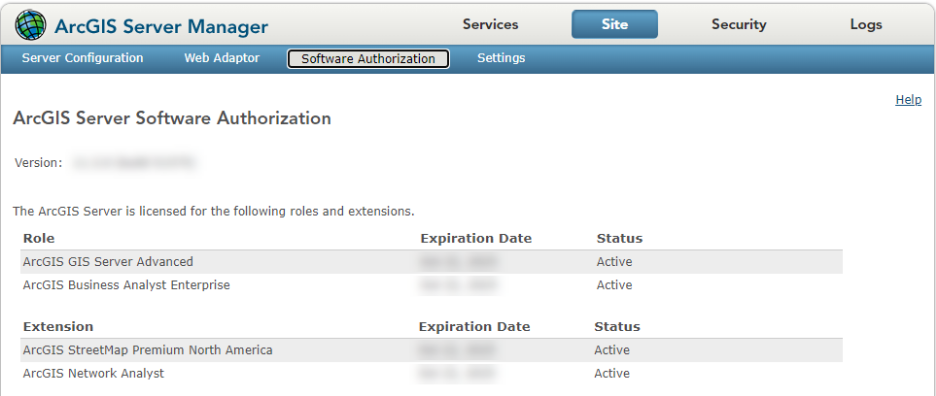
- Open the software authorization wizard, for example on Windows, Start > Program Files > ArcGIS > Software Authorization, as shown in the image below, and configure the machine with the license file.
ArcGIS Pro
Business Analyst Enterprise includes three Professional user types for access to ArcGIS Pro Standard with three add-on licenses for Business Analyst, Network Analyst, and StreetMap Premium North America extensions for ArcGIS Pro.
The local data for ArcGIS Pro requires an .sdlic file which must be downloaded and installed. This workflow has been added to this article only for the reader's convenience and can be found in the product documentation page on how to license the local data for ArcGIS Pro.
- Log in to My Esri.
- Click Licensing and click License Files.
- Click Business Analyst and StreetMap Premium.
- Click Download to download the .sdlic file.
- Start ArcGIS Pro as an administrator.
- On the ArcGIS Pro start page, click Settings in the upper left corner of the application window. Alternatively, if you have a project open, click the Project tab on the ribbon.
- On the Settings page, click Licensing.
- Under Settings, click Manage your data licensing.
- Click Add and browse to where the .sdlic file is located.
- Select the .sdlic file and click Open.
- In the Manage Data Licenses window, a list of the Business Analyst datasets is shown. Click OK and exit the Licensing window.
- Restart ArcGIS Pro.
Article ID: 000039022
- ArcGIS Business Analyst Enterprise
Get support with AI
Resolve your issue quickly with the Esri Support AI Chatbot.


Discover more on this topic

Search for related information

Find training related to this topic

Explore ideas and give feedback
Get help from ArcGIS experts
Start chatting now