
ERROR
ArcGIS License Manager: FlexNet Licensing Error -97
Error Message
When managing an ArcGIS License Manager in a secure or firewall-restricted environment, it is often necessary to configure static ports for consistent communication between the license server and its clients. This article outlines how to stop the license manager temporarily and modify the configuration to assign static ports.
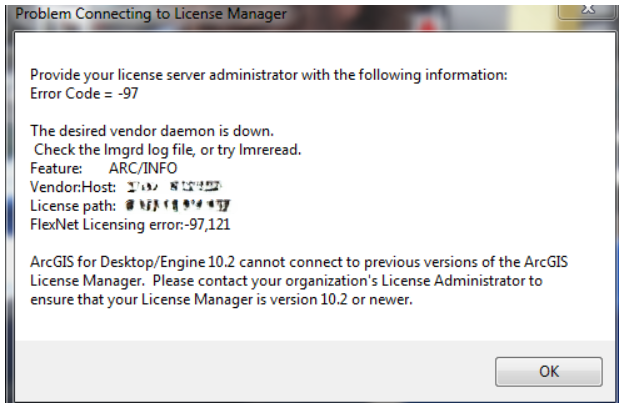
While launching ArcGIS Desktop, a pop-up appears stating
Problem Connecting to License Manager
Provide your license server administrator with the following information:
Error Code: -97
The desired vendor daemon is down.
You need to define a static port in service.txt file (any port in the range of 27001-27009).
Cause
By default, ArcGIS License Manager assigns ports dynamically. However, in environments with strict firewall rules, specifying static ports ensures that necessary communication can occur without unexpected disruptions.
Solution or Workaround
Before making any configuration changes, the License Manager must be stopped. This momentarily interrupts any active connections to the license server.
- Click Start > Programs > ArcGIS > License Manager > License Server Administrator.
- Select Start/Stop License Server in the table of contents and click Stop.
-
Open Windows Explorer and go to the default installation directory:
C:\Program Files\ArcGIS\License10.0\bin -
Locate the file named
service.txt. - This file contains licensing configuration parameters and typically appears as follows:
SERVER this_host ANY VENDOR ARCGIS FEATURE ACT ARCGIS 1 permanent 1 7ED49106D630
- At the end of line one, choose to specify a port number immediately after ANY. On the VENDOR line, add PORT=####, where #### is a specific port number designated by you, to lock the vendor daemon to that specific port, for example, 1234. After making the changes, the service.txt file should look something like this:
SERVER this_host ANY 27001 VENDOR ARCGIS PORT=1234 FEATURE ACT ARCGIS 1 permanent 1 7ED49106D630
- Save the modified service.txt file.
- Return to the License Server Administrator.
- Click Start to restart the license service.
The License Manager is now configured with static ports, and the vendor daemon is bound to the specified port.
Note:
Ensure that both configured ports (e.g., 27001 and 1234) are added as exceptions in your firewall settings. This step is crucial for enabling seamless communication between clients and the license server.
Article ID: 000035157
- ArcGIS Desktop
Get support with AI
Resolve your issue quickly with the Esri Support AI Chatbot.


Discover more on this topic

Search for related information

Find training related to this topic

Explore ideas and give feedback
Get help from ArcGIS experts
Start chatting now