
Bug
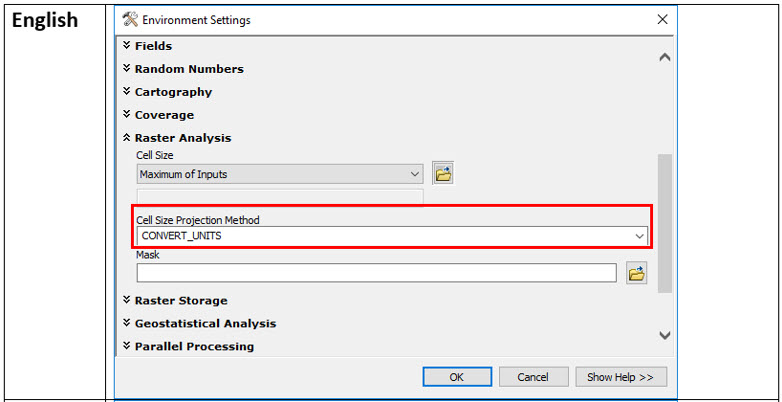
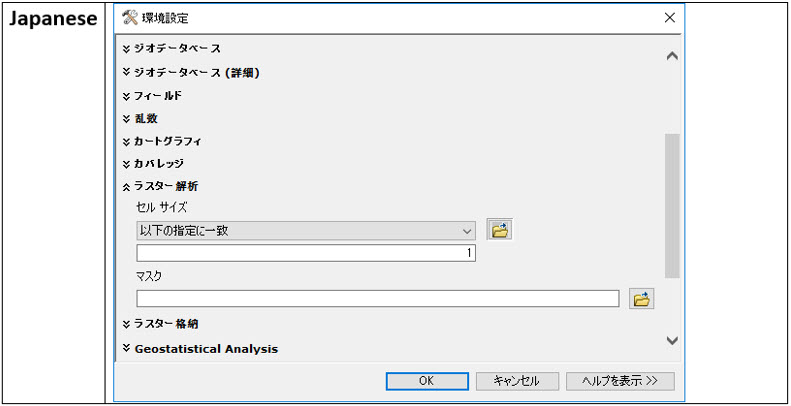
The Cell Size Projection Method (Environment setting) option is unavailable when using the ArcMap 10.7 Japanese, Spanish and French graphical user interface (GUI).
| Bug ID Number | BUG-000123295 |
|---|---|
| Submitted | June 25, 2019 |
| Last Modified | June 5, 2024 |
| Applies to | ArcGIS for Desktop |
| Version found | 10.7 |
| Operating System | Windows OS |
| Operating System Version | 10.0 64 Bit |
| Status | Will Not Be Addressed |
Description
The Cell Size Projection Method in the Environment Settings option is unavailable when using ArcMap 10.7 and 10.7.1 in the Japanese, French or Spanish user interface. This is also an issue if versions 10.7 or 10.7.1 of ArcReader, ArcGIS Engine, or ArcGIS Server have been installed.
Cause
Inconsistent translation was the root cause.
Workaround
Replace the XML files with the corrected XML file for corresponding language.
To circumvent this issue, follow the steps below:
- Close the ArcGIS Desktop application.
- In Window Explorer, browse to the geoprocessing Environments folder for the affected version and language, for example, assuming that ArcGIS was installed on the C:/ drive, for the Japanese language at Version 10.7 the path is:
C:\Program Files(x86)\ArcGIS\Desktop10.7\help\ja\gp\Environments
Similarly, for ArcReader, ArcGIS Server, and ArcGIS Engine, the paths are:
<install location>\ArcReader10.7\help\ja\gp\Environments\Spatial Analyst Tools.xml
<install location>\ArcGIS\server\help\ja\gp\Environments\Spatial Analyst Tools.xml
<install location>\ArcGIS\Engine10.7\help\ja\gp\Environments\Spatial Analyst Tools.xml
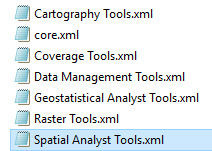
- Rename Spatial Analyst Tools.xml in each location above. For example: ‘Spatial Analyst Tools_old.xml’
- Download, extract, and replace the corrected Spatial Analyst Tools.xml for the affected language, at these locations.
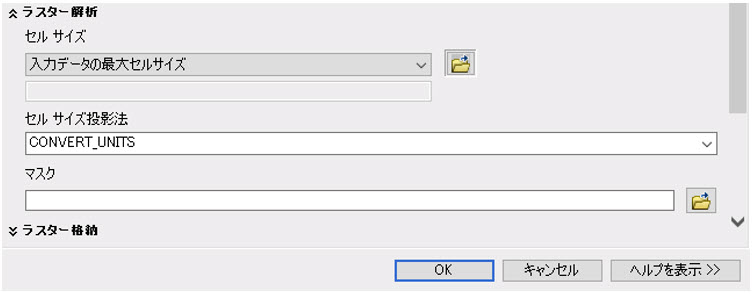
See the Related Information section below for the appropriate download. - Restart ArcGIS and this option should now be visible.
Steps to Reproduce
Bug ID: BUG-000123295
Software:
- ArcGIS for Desktop
Get notified when the status of a bug changes


Related Information
Discover more on this topic

Search for related information

Find training related to this topic

Explore ideas and give feedback
Get help from ArcGIS experts
Download the Esri Support App