
Bug
ModelBuilder partially displays or overlaps the tools and arrows when loading a model that is edited and saved in a different Region and Language settings.
| Bug ID Number | BUG-000095536 |
|---|---|
| Submitted | April 5, 2016 |
| Last Modified | September 8, 2025 |
| Applies to | ArcGIS for Desktop |
| Version found | 10.4 |
| Operating System | Windows OS |
| Operating System Version | 2012 R2 |
| Version Fixed | 10.5.0 |
| Status | Fixed |
Description
This bug occurs when a model is edited in another regional and locale format. The scenario and workarounds described below are based on a German example.
Geoprocessing models that have been created, run and saved with ArcGIS for Desktop and ModelBuilder 10.4 using region and language settings for German (Germany), are not correctly displayed in ModelBuilder 10.4. Often this behavior takes place after restarting the machine and reopening the model in ModelBuilder 10.4.
For models created with ArcGIS for Desktop 10.3.1 or older versions using German language setrtings, the display is also incorrect if the models are displayed in ModelBuilder 10.4 under German language settings. For both cases, the display is as follows.
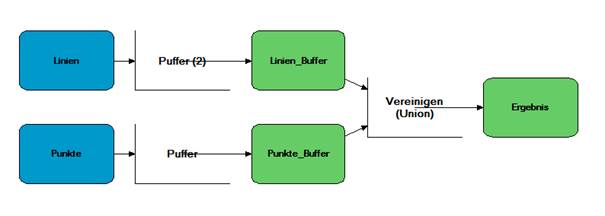
The models successfully run ModelBuilder or as a tool. It is also possible to edit and save the models in ModelBuilder.
Workaround
Workaround 1: Changing Regional Settings
In some cases, changing the language settings from German (Germany) to English (United States) does solve the display issue. In these cases, go to Control panel > Region and Language > Format. choose English (United States), and Restart ArcGIS for Desktop.
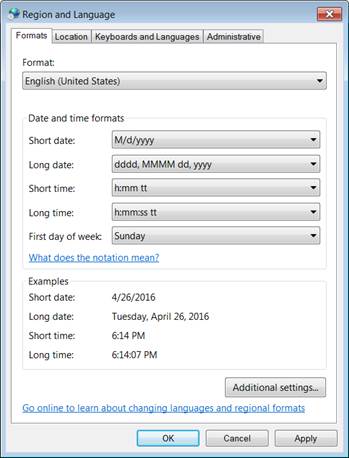
Optional: the regional settings can be set to any format by changing the point/comma delimiter, such as German (Switzerland).
If it is not desired to change these settings or if it doesn’t help, there is no other way to solve the display issue at this time. However it is still possible to use and edit these models.
Model editing in ModelBuilder 10.4
Editing the models in ModelBuilder still works with some restrictions:
- In ModelBuilder, it is still possible to select a tool by using the Select tool.
 Because of the display issue, graphical elements of tools have a limited responsiveness regarding selections. It is recommended to interactively select the tool by pulling a rectangle around the tool via the Select tool.
 - If hovering over one of the tool’s selection points, a tool tip pops up that shows that the tools are still active although they aren’t shown correctly. By right-clicking such a selection point, the tool’s dialog can be opened via the context menu.
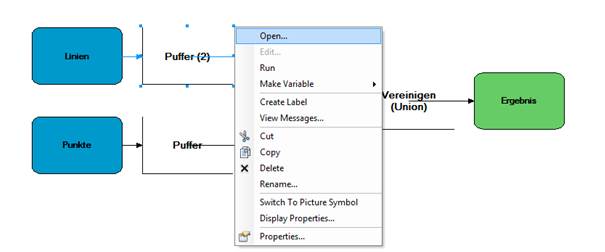
- Rearranging the model elements is still possible by using the Auto Layout
 function. For manually moving and rearranging single model elements, select the tool element and the connected input or output data variable.
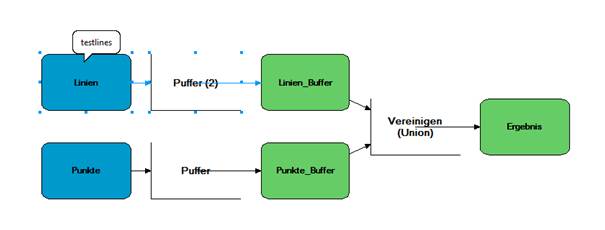
- Tools that have been added after the display issue took place cannot become connected with existing data variables by using the Connect tool
 You always have to open the tool’s dialog and choose the variable from the drop-down list.
 - Input layers show up with the following symbol:

- Derived data variables are shown as:
 within the drop-down list.
Workaround
Change the regional setting in Control Panel to English (United States) - although this does not always work. If the user adds a new tool to the models, it cannot be connected by using the Connect tool except by opening the tool dialog box.Steps to Reproduce
Bug ID: BUG-000095536
Software:
- ArcGIS for Desktop
Get notified when the status of a bug changes


Related Information
Discover more on this topic

Search for related information

Find training related to this topic

Explore ideas and give feedback
Get help from ArcGIS experts
Download the Esri Support App