
Bug
Inconsistency with ArcGIS Pro’s georeferencing tools installed in the Spanish environment.
| Bug ID Number | BUG-000141219 |
|---|---|
| Submitted | July 3, 2021 |
| Last Modified | June 5, 2024 |
| Applies to | ArcGIS Pro |
| Version found | 2.8 |
| Operating System | Windows OS |
| Operating System Version | 10.0 64 Bit |
| Status | Non-Reproducible |
Description
When a computer's regional settings use something other than a period (.) as a decimal separator, the georeference rotation tool fails to save the rotation set by the user when there is not an associated spatial reference for the data.
Cause
This is caused by a decimal symbol set as something other than a period, and/or the digit grouping symbol set as something other than a comma (,).
Workaround
To workaround this issue, define a projection for your BIM or CAD features before adding your BIM or CAD content to a map.
- Run the Define Projection geoprocessing tool on the BIM File feature class (IFC or Revit).
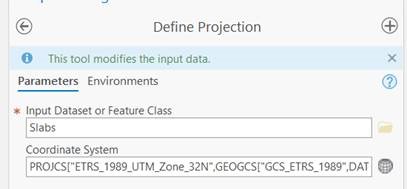
- Once the projection is defined, add your content to a map or scene and continue with the georeferencing process.
- This issue has been resolved in ArcGIS Pro 2.9.
- This issue does not affect ArcGIS Pro 2.7.3 and earlier versions.
Steps to Reproduce
Bug ID: BUG-000141219
Software:
- ArcGIS Pro
Get notified when the status of a bug changes


Discover more on this topic

Search for related information

Find training related to this topic

Explore ideas and give feedback
Get help from ArcGIS experts
Download the Esri Support App