
Bug
Downloading Revit models that have linked models and design collaboration enabled from the BIM 360 connections in ArcGIS Pro, results in downloading a corrupted Revit file.
| Bug ID Number | BUG-000135961 |
|---|---|
| Submitted | December 8, 2020 |
| Last Modified | December 12, 2024 |
| Applies to | ArcGIS Pro |
| Version found | 2.6.3 |
| Operating System | Windows OS |
| Operating System Version | 10.0 64 Bit |
| Version Fixed | 2.8 |
| Status | Fixed |
Description
BIM Cloud Connection zips files when downloading them from BIM 360. Because of this, ArcGIS Pro cannot directly read the file and display a message of an unsupported file. This behavior only happens when the following criteria are met.
- The Revit file is linked.
- BIM 360 is using the design and collaboration function.
- The total size of the Revit file plus the linked files is at or over the max limit.
Cause
BIM Cloud Connection zips files by mistake.
Workaround
Esri is working to find a solution in the next release. In the meantime, please use the following as a workaround.
- Close ArcGIS Pro.
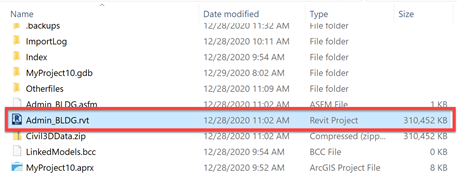
- Using File Explorer navigate to the folder where the BIM Cloud Connection downloaded the Revit file.
- Change the extension of the Revit file from .RVT to .ZIP
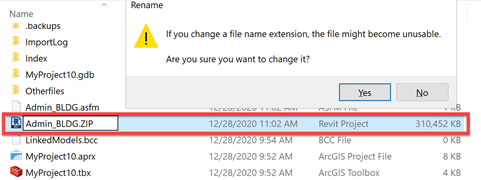
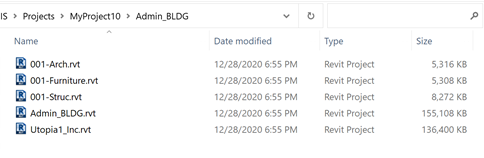
- Extract the data from the folder. The folder contains all the linked files associated to the main downloaded file.
Using the Get Status command
- The Get Status works as designed.
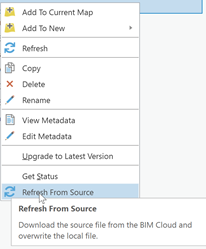
Using the Refresh from Source command
- The refresh command works, but downloaded data is again in the .zip format with an .rvt extension. To resolve this issue, follow the steps outlined above in the workaround
Steps to Reproduce
Bug ID: BUG-000135961
Software:
- ArcGIS Pro
Get notified when the status of a bug changes


Discover more on this topic

Search for related information

Find training related to this topic

Explore ideas and give feedback
Get help from ArcGIS experts
Download the Esri Support App