
Bug
All anotations are in weird angles after upgrading to SDE 9.2
| Bug ID Number | NIM005657 |
|---|---|
| Submitted | December 18, 2006 |
| Last Modified | April 2, 2025 |
| Applies to | No Product Found |
| Version found | 9.2 |
| Status | Known Limit |
Description
In ArcGIS 9.2, some annotation feature classes display at angles that contradict their bounding box.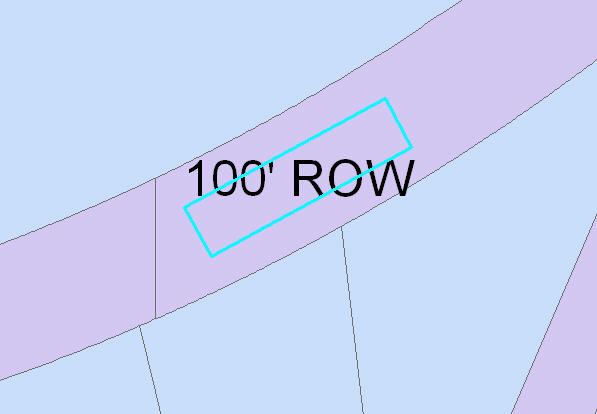
Checking the angle set for the feature in the attribute table does not fix this issue.
Cause
The two-point text baselines for annotation features is too small. When an annotation feature class uses a two-point text baseline, the angle is derived from these points.When the annotation feature class is snapped to the new high precision spatial reference, the tiny positional change results in a massively different text angle.
Workaround
Use the following script to fix this issue:- Add the problematic data to ArcMap.
- Navigate to Editor > Start Editing to begin an edit session.
- Ensure the Target on the Editor toolbar is set to the offending annotation feature class.
- Start the Visual Basic Editor by navigating to Tools > Macros > Visual Basic Editor.
- In the Project Explorer window, expand the Project > ArcMap Objects folder and double-click ThisDocument.
![[O-Image] [O] object vb_thisdocument](https://webapps-cdn.esri.com/CDN/support-site/technical-articles-images/000009429/00N39000003LL2C-0EM39000000wd27.png)
Note:
Code in ThisDocument module only runs in the current map document. To store the code in all map documents, open the Normal.mxt ThisDocument code module.
- Copy the following into the code module.
Option Explicit 'Set this flag to false to make a one point baseline, otherwise it'll make 'a two point baselines which is generally desired Private Const MakeTwoPoint As Boolean = True Public Sub SmallBaselineToOneorTwoPointBaseline() Dim pApp As IApplication Dim pEditor As IEditor Dim pMxDoc As IMxDocument Dim pEnumFeature As IEnumFeature Dim pAnnoFeat As IAnnotationFeature Dim pElement As IElement Dim pPolyline As IPolyline Dim pFeature As IFeature Dim pGeometry As IGeometry Dim Count As Integer Dim pID As New UID Dim pPointCollection As IPointCollection pID = "esriEditor.Editor" Set pApp = Application Set pMxDoc = pApp.Document Set pEditor = pApp.FindExtensionByCLSID(pID) If pEditor.EditState = esriStateNotEditing Then MsgBox "Please start an edit session and select annotation features." Exit Sub End If Set pEnumFeature = pEditor.EditSelection pEnumFeature.Reset pEditor.StartOperation Set pFeature = pEnumFeature.Next For Count = 0 To pEditor.SelectionCount - 1 If TypeOf pFeature Is IAnnotationFeature Then Set pAnnoFeat = pFeature Set pElement = pAnnoFeat.Annotation If TypeOf pElement Is ITextElement Then Set pGeometry = pElement.Geometry If TypeOf pGeometry Is IPolyline Then Set pPointCollection = pGeometry If pPointCollection.PointCount = 2 Then If MakeTwoPoint = True Then pAnnoFeat.Annotation = MakeTwoPointGeometry(pElement, pFeature.Shape) Else pElement.Geometry = MakeOnePointGeometry(pElement) pAnnoFeat.Annotation = pElement End If pFeature.Store Debug.Print "Updated Feature: " & pFeature.OID End If End If End If End If Set pFeature = pEnumFeature.Next Next Count pEditor.StopOperation ("Update text with small two point baselines to proper geometries") Dim pActiveView As IActiveView Set pActiveView = pMxDoc.ActiveView pActiveView.PartialRefresh esriViewGeography, Nothing, pActiveView.extent End Sub Private Function MakeOnePointGeometry(pTextElement As ITextElement) As IGeometry Dim pElement As IElement Set pElement = pTextElement Dim pGeometry As IGeometry Dim pPolyline As IPolyline Set pGeometry = pElement.Geometry If TypeOf pGeometry Is IPolyline Then Set pPolyline = pGeometry Else MsgBox "This function only works with polyline text element geometries" End If Dim pPoint As IPoint Set pPoint = New Point Set pPoint.SpatialReference = pGeometry.SpatialReference Dim horzAlign As esriTextHorizontalAlignment 'generate the correct point based on the horzizontal alignment Select Case horzAlign Case esriTHALeft pPolyline.QueryFromPoint pPoint Case esriTHARight pPolyline.QueryToPoint pPoint Case Else 'esriTHACenter and esriTHAFull pPolyline.QueryPoint esriNoExtension, 0.5, True, pPoint 'get midpoint End Select Set MakeOnePointGeometry = pPoint End Function Private Function MakeTwoPointGeometry(pTextElement As ITextElement, pPolygon As IPolygon) As IElement 'with a rectangluar shape of the elements bounds 'we'll delete all but two points from the polygon 'and then make a line from it Dim pPointColl As IPointCollection Set pPointColl = pPolygon 'remove points 5,1,2 leaving points 0 and 4 (the lower left and right corners) pPointColl.RemovePoints 4, 1 pPointColl.RemovePoints 1, 2 'make a new polyline from the point collection Dim pPointColl2 As IPointCollection Set pPointColl2 = New Polyline pPointColl2.AddPointCollection pPointColl 'set the geometry of the text element to be the polyline 'this will make it a two point textpath Dim pElement As IElement Set pElement = pTextElement pElement.Geometry = pPointColl2 Set pTextElement = pElement Dim pSymbolCollectionElement As ISymbolCollectionElement 'we need to reset the offset and vertical alignment because the feature shape doesn't 'represent it. Otherwise, the text will move if it has offsets Set pSymbolCollectionElement = pTextElement pSymbolCollectionElement.XOffset = 0 pSymbolCollectionElement.YOffset = 0 pSymbolCollectionElement.VerticalAlignment = esriTVABottom Set MakeTwoPointGeometry = pElement End Function - Save and close the Visual Basic Editor.
- Run the code.
- Click Tools > Macros > Macros to display the macros dialog box.
- Select a macro and click Run.
Steps to Reproduce
Bug ID: NIM005657
Software:
- No Product Found
Get notified when the status of a bug changes


Discover more on this topic

Search for related information

Find training related to this topic

Explore ideas and give feedback
Get help from ArcGIS experts
Download the Esri Support App