
Bug
After setting the display units to degrees minutes seconds in the data frame no other display unit options can be displayed in the status bar.
| Bug ID Number | NIM073711 |
|---|---|
| Submitted | October 7, 2011 |
| Last Modified | June 5, 2024 |
| Applies to | ArcGIS for Desktop |
| Version found | 10.0 |
| Operating System | Windows OS |
| Operating System Version | XP 64 Bit |
| Status | Will Not Be Addressed |
Description
Attempts to switch to Decimal Degrees, after setting the display units to Degrees Minutes Seconds on the General tab of the Data Frame Properties dialog box, fail. However, this issue does not occur if the data frame display units are modified on the Data View tab of the ArcMap Options dialog box.
Cause
The cause of this bug is unknown, but the issue can be avoided by specifying the data frame display units on the Data View tab of the ArcMap Options dialog box.
Workaround
If the display units on the General tab of the Data Frame Properties dialog box have been changed to Degrees Minutes Seconds, and it is necessary to switch to Decimal Degrees, use the following workaround.
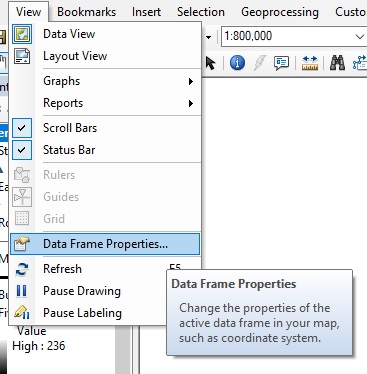
- In ArcMap, open the View drop-down menu, and select Data Frame Properties.
- Click the General tab of the Data Frame Properties window.
- Select a unit type other than Decimal Degrees, for example, Nautical Miles, from the Display drop-down menu.
- Click Apply, and OK.
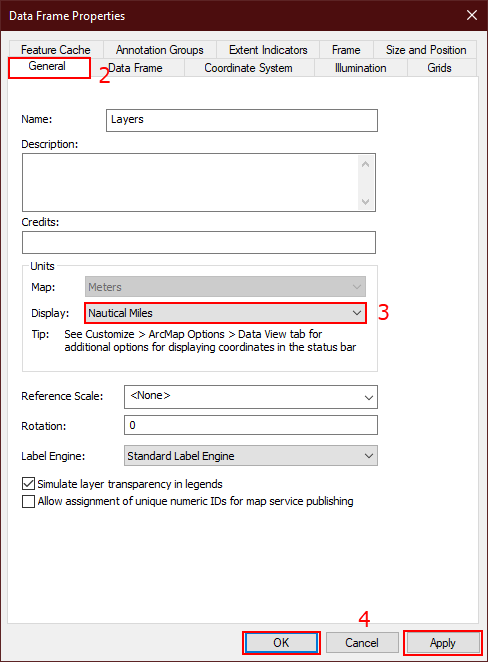
- Repeat the process and select Decimal Degrees. The units displayed in the status bar are saved correctly.
Note:
A coordinate system must be assigned to the data frame on the Coordinate System tab of the Data Frame Properties window before the display units can be changed.
Steps to Reproduce
Bug ID: NIM073711
Software:
- ArcGIS for Desktop
Get notified when the status of a bug changes


Related Information
Discover more on this topic

Search for related information

Find training related to this topic

Explore ideas and give feedback
Get help from ArcGIS experts
Download the Esri Support App