Patches and updates
ArcGIS (Desktop, Engine, Server) 9.3 Map Export Patch to support Adobe Acrobat 9 PDF
Summary
Description
ESRI® announces the ArcGIS (Desktop, Engine, Server) 9.3 Map Export Patch to support Adobe Acrobat 9 PDF. Adobe® Acrobat® and Adobe Reader® version 9 support a new version of PDF that allows for encoding of map coordinate system and georeference information inside the PDF file. When a georeferenced PDF is opened in a compatible viewer, such as Adobe Reader 9, the user can access geospatial functions like coordinate readout and find XY. This patch enables ArcGIS Desktop, Engine, and Server applications to export georeferenced PDF files. We recommend that any ArcGIS 9.3 user who wishes to take advantage of the new PDF features download and install this patch.
Issues Addressed with this Patch
NIM036473 - Enable PDF "Export Map Georeference Information" functionality to support Acrobat 9 PDF.
Files Installed in this Patch
Under the C:\Program Files\ArcGIS\Bin folder:
PDFExporter.dll
ExportUI.dll
Under the C:\Program Files\ArcGIS\Help folder:
page_layout_and_map_composition.chm
page_layout_and_map_composition.lif
Installing this Patch
ArcGIS 9.3 must be installed before you can install this Patch.
Installation Notes:
After installing this patch, the new PDF export functionality can be controlled in ArcGIS Desktop via a new checkbox on the in the Export Map dialog's PDF format Advanced options panel:
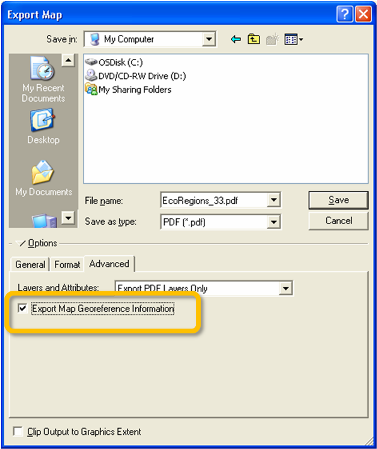
Installing the patch on ArcGIS Server or ArcGIS Engine will enable map georeference output by default. Export of georeference info can be suppressed via ArcObjects by setting the IExportPdf2:ExportMeasureInfo property to false.
Patch Updates
Check Online Support Center periodically for the availability of additional patches. New information about this Patch will be posted here.
How to identify which Patch is installed
To find out what products and which patches are currently installed on your machine, download the PatchFinder93.exe utility and run it from your local machine.
Getting Help
Domestic sites, please contact ESRI Technical Support at 1-888-377-4575, if you have any difficulty installing this Service Pack. International sites, please contact your local ESRI software distributor.
- Make sure you have write access to your ArcGIS installation location, and that no one is using ArcGIS.
- Download ArcGIS-93-PDF-Patch.zip to a location other than your ArcGIS installation location.
- Use WinZip to extract the Patch files.
- Double-click ArcGIS-93-PDF-Patch.exe to start the install process. The Setup automatically detects the ArcGIS products you have installed (Desktop, Engine or Server) on your machine and executes the appropriate patch or patches accordingly.
- When Setup starts, follow the instructions on your screen.
- After the patch is successfully installed, your ArcGIS installation will be capable of exporting to the new PDF format
If you have installed client setups from a shared Network Administrative ArcGIS Desktop setup, this Patch must be applied to this administrative installation location as well as all client installations.
To apply a patch to a network administrative setup, use the following command to execute the msp files directly instead of using the ArcGIS-93-PDF-Patch.exe:
msiexec.exe /a [location of administrative installation]\setup.msi /p [location of patch]\msp\<Product>.msp
After applying the patch to the administrative installation location, you must update each client installation with the changes. To apply patch changes to a client installation:
msiexec.exe /i [location of administrative installation]\setup.msi RENSTALL=ALL REINSTALLMODE=vomus
Download ID:1407
Get help from ArcGIS experts
Download the Esri Support App